Hi,
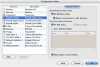
I have checked the boxes to share "All Windows disks" and "Mount virtual disks to Mac desktop" under Shared Folders, but I still can't find anything on the mac desktop. This used to work before.. not sure what had happened. DOes anyone ever encounter something similar or have any suggestions how to resolve this?
THanks in advance!
I have checked the boxes to share "All Windows disks" and "Mount virtual disks to Mac desktop" under Shared Folders, but I still can't find anything on the mac desktop. This used to work before.. not sure what had happened. DOes anyone ever encounter something similar or have any suggestions how to resolve this?
THanks in advance!