N nd2accelerate Bit poster Aug 28, 2009 #1 Ever since I compressed my Windows XP VM I keep getting this warning. What should I do to resolve this? Attachments Picture 2.png 14.2 KB · Views: 5
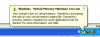
Ever since I compressed my Windows XP VM I keep getting this warning. What should I do to resolve this?
W WaltM Bit poster Aug 31, 2009 #2 After taking your advice to run Parallels Compressor (which did solve my VM file size problem) I have also noticed that I am getting this same warning message. Hopefully someone can help us!
After taking your advice to run Parallels Compressor (which did solve my VM file size problem) I have also noticed that I am getting this same warning message. Hopefully someone can help us!
N nd2accelerate Bit poster Sep 8, 2009 #3 Obviously never got an answer here, but kept checking and finally found this thread. I tried it and so far so good. http://forum.parallels.com/showthread.php?t=22136 If the thread link doesn't work, here's what they recommended doing: GOTO Control Panel - System - Advanced Tab - Performance - Settings Under Performance Options - Advanced - Virtual Memory - Change Select - No Paging File - then hit SET - Then OK out of all screens. This Deletes the Swap File Restart Windows - Then Go back to: GOTO Control Panel - System - Advanced Tab - Performance - Settings Under Performance Options - Advanced - Virtual Memory - Change Select - Custom Size - 768 as Min and 1536 as Max and hit set then OK. This creates a new Swap File Restart Windows
Obviously never got an answer here, but kept checking and finally found this thread. I tried it and so far so good. http://forum.parallels.com/showthread.php?t=22136 If the thread link doesn't work, here's what they recommended doing: GOTO Control Panel - System - Advanced Tab - Performance - Settings Under Performance Options - Advanced - Virtual Memory - Change Select - No Paging File - then hit SET - Then OK out of all screens. This Deletes the Swap File Restart Windows - Then Go back to: GOTO Control Panel - System - Advanced Tab - Performance - Settings Under Performance Options - Advanced - Virtual Memory - Change Select - Custom Size - 768 as Min and 1536 as Max and hit set then OK. This creates a new Swap File Restart Windows