I have already submitted this problem to the Parallels (10411237), but if someone has a solution, I'd love to hear it earlier rather than later.
1. Opened Parallels Desktop.
2. Started New Virtual Machine wizard.
3. Chose to install from file.
4. Selected the DLM-w7hp86iso.app file, which I have already downloaded per instructions on the "Installing Windows 7 Parallels Desktop 6 for MAC" which was included in the Downloads at the end of my purchase on your site.
5. System prompted me with "unable to detect OS" message, so I manually selected Windows 7 as the operating system.
6. System took me to a screen for entering my Windows Activation Unlock Code.
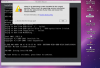
7. System took me to a terminal like window. See attached screenshot. "No boot device available."
Not sure if this matters, but I purchased Parallels 7 and the Windows 7 Home Premium as a combination deal from your website here: http://www.parallels.com/windows7/
Thanks,
Linda
1. Opened Parallels Desktop.
2. Started New Virtual Machine wizard.
3. Chose to install from file.
4. Selected the DLM-w7hp86iso.app file, which I have already downloaded per instructions on the "Installing Windows 7 Parallels Desktop 6 for MAC" which was included in the Downloads at the end of my purchase on your site.
5. System prompted me with "unable to detect OS" message, so I manually selected Windows 7 as the operating system.
6. System took me to a screen for entering my Windows Activation Unlock Code.
7. System took me to a terminal like window. See attached screenshot. "No boot device available."
Not sure if this matters, but I purchased Parallels 7 and the Windows 7 Home Premium as a combination deal from your website here: http://www.parallels.com/windows7/
Thanks,
Linda