
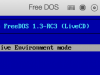
TBH I don't understand point of having blurry bi-linear filtering video.scale_filter=1 by default. (left image below)
 vs
vs 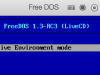
video.scale_filter=0 (default) video.scale_filter=1
For all systems that do not support HiDPI (aka Retina scaling) which are mostly legacy systems, default no filtering manually enabled with video.scale_filter=0 in Boot flags IMHO (right image) always looks sharper and crisper on Mac Retina display than bi-linear default (left image).
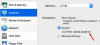
I find quite annoying I need to manually copy&paste text to enable it for every non-Retina aware VM system as there's dedicated UI / checkbox for that.
Therefore my feature suggestion is to make video.scale_filter=0 (aka no filtering or nearest neighbor) a default one or at least add a switch somewhere in Graphics section to turn off that filtering.
vs video.scale_filter=0 (default) video.scale_filter=1
For all systems that do not support HiDPI (aka Retina scaling) which are mostly legacy systems, default no filtering manually enabled with video.scale_filter=0 in Boot flags IMHO (right image) always looks sharper and crisper on Mac Retina display than bi-linear default (left image).
I find quite annoying I need to manually copy&paste text to enable it for every non-Retina aware VM system as there's dedicated UI / checkbox for that.
Therefore my feature suggestion is to make video.scale_filter=0 (aka no filtering or nearest neighbor) a default one or at least add a switch somewhere in Graphics section to turn off that filtering.