Hi, group.
I tried to read other threads, but got no answers to my problem.
I was an "old" Parallels user, working with Windows 95 with no hassles.
I then moved to work with Bootcamp, because I was needing no "hard work" on Windows.
But now, with my desktop computer with OS Catalina, I gave Parallels a new chance... and I like what I see. To work with Windows 10 is total new to me and I found a "major" problem:
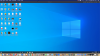
- My Parallels Windows Desktop is EXACTLY the same as my Mac Desktop.
I really need a "clean Windows, with his "own" Desktop. I need to have "independent" desktops.
How can I do this? And how can I have "two computers"? Disk partition? How do I do it on Parallels (which configuration)?
Thanks in advance for enlighten a "poor newbie".
All the best
Pedro
I tried to read other threads, but got no answers to my problem.
I was an "old" Parallels user, working with Windows 95 with no hassles.
I then moved to work with Bootcamp, because I was needing no "hard work" on Windows.
But now, with my desktop computer with OS Catalina, I gave Parallels a new chance... and I like what I see. To work with Windows 10 is total new to me and I found a "major" problem:
- My Parallels Windows Desktop is EXACTLY the same as my Mac Desktop.
I really need a "clean Windows, with his "own" Desktop. I need to have "independent" desktops.
How can I do this? And how can I have "two computers"? Disk partition? How do I do it on Parallels (which configuration)?
Thanks in advance for enlighten a "poor newbie".
All the best
Pedro