Parallels 6 and XP HID compliant mouse

BoM

Bit poster
Hi

upgraded to parallels 6 (wish I didn't)

My XP image cant upgrade to parallels 6 ... it requires the xp pro system disk for several drivers ... a disk that I do not have.
One of the files it requires is kuser.dll and another is HID compliant mouse drivers...

Why? and what to do. Don't answer "Buy a WIN XP" - please
 
You could try to disable USB keyboard and mouse at all adding the following boot flags for your VM using "Virtual Machine->Configure->Boot Order->Boot flags":

Code:
devices.usb.enable_mouse=0;devices.usb.enable_keyboard=0

Please let us know if this helps to you.
 
Still no good - ksuser.dll is required

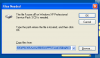
Well - as Andy points out, it fixes the "HID compliant.." problem but NOT the ksuser.dll (see attached)

Please help!
 

Attachments

  • XP_pro_parallels_prob.png
    XP_pro_parallels_prob.png
    21.5 KB · Views: 14
And other way. You can locate system folder as source for this dll.
Try click Browse and select c:\windows\system32 path for 'Copy files from' field.
 
I found my XP SP3 cd and now it is up and running. It is just a pain that the CD is needed - my win 7 pro ticked through the parallels 6 update with no problems
 
Hello, seems like some "optimization" software delete C:\WINDOWS\Driver Cache\i386\*.cab (for x32 version). This CAB's used to install drivers without installation media (CD/DVD).
 
Back
Top