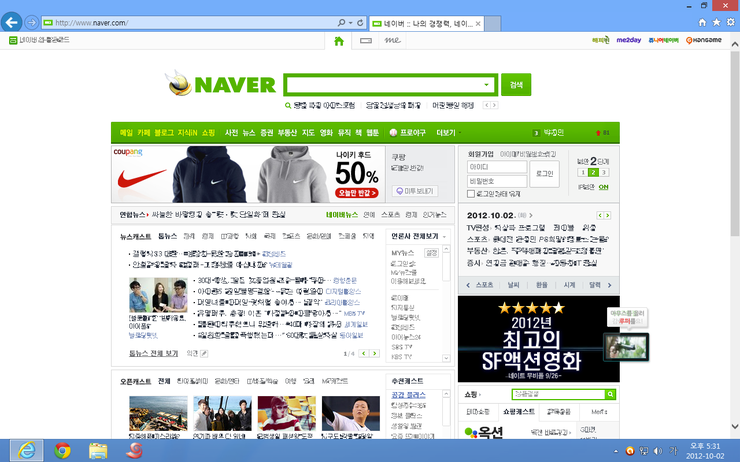
Parallels 8 (Windows 8) Display Trouble.

Jong-seungP

Bit poster
Mac OS X Version : 10.8. 2
Parallels Version : 8.0.18101
Guest OS : Windows 8 Pro K
Trouble App : Internet Explorer 10.0.9200.16384

t1.png


why are you doing this?
 
Last edited:
Mac OS X Version : 10.8. 2
Parallels Version : 8.0.18101
Guest OS : Windows 8 Pro K
Trouble App : Internet Explorer 10.0.9200.16384

%BD%BA%C5%A9%B8%B0%BC%A6_2012-10-02_%BF%C0%C8%C4_5.31.19.png


why are you doing this?

I can't see your picture, but based on your information, it seems like you're having a problem with displaying Korean characters. I'm having the exact same problem as you on English copy of Windows 8 Pro displaying Korean characters.

It's not one of those typical unicode problem (where texts look like %$$^$@&*(). Korean characters do display fine. It's just that the characters look very compression. For example, if there was a Korean character, big 'O', it would look like small O with blurs, which makes difficult to read.
 
I can't see your picture, but based on your information, it seems like you're having a problem with displaying Korean characters. I'm having the exact same problem as you on English copy of Windows 8 Pro displaying Korean characters.

It's not one of those typical unicode problem (where texts look like %$$^$@&*(). Korean characters do display fine. It's just that the characters look very compression. For example, if there was a Korean character, big 'O', it would look like small O with blurs, which makes difficult to read.

t2.png


In Chrome there is no problem.
My Windows 8 Version is Korean Pack.
 
Hello Guys,

Can you please send the Problem report from Help menu --> report a Problem and a good working screenshot would be very helpful. Thanks. Please post the report ID here!
 
Try changing VM Configuration > Hardware > Video > 3D Acceleration from DirectX 10 to DirectX 9.
 
Back
Top