Parallels Desktop Version: Build 8.0.18615
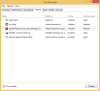
My Parallels Desktop running with the Windows 8.1 64bits. One of the thing very annoying is the "Reader" Metro App/Program will auto open by itself. Even I close it, it will auto open again. I tried to delete the image, and install a fresh version of it, the problem still always occurs.
My friend running with Build 9.0 does not have this issue. I am sure it is the bug from Parallels Desktop. I sent 3 reports to the support until now no one responded to me.
Thanks.
My Parallels Desktop running with the Windows 8.1 64bits. One of the thing very annoying is the "Reader" Metro App/Program will auto open by itself. Even I close it, it will auto open again. I tried to delete the image, and install a fresh version of it, the problem still always occurs.
My friend running with Build 9.0 does not have this issue. I am sure it is the bug from Parallels Desktop. I sent 3 reports to the support until now no one responded to me.
Thanks.