Install the app
How to install the app on iOS
Follow along with the video below to see how to install our site as a web app on your home screen.
Note: This feature may not be available in some browsers.
You are using an out of date browser. It may not display this or other websites correctly.
You should upgrade or use an alternative browser.
You should upgrade or use an alternative browser.
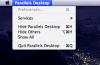
Parallels menu bar is empty
- Thread starter frankie
- Start date
Sorry I wasn't clearer. I run with dual displays. The Mac menu bar is on my MBP, Windows taskbar is on the outboard monitor. When I activated Parallels yesterday, the only menu items were Apple menu and the Parallels Desktop menu. Nothing else on the bar except the right-side icons.
After looking up the shift-alt-ctrl hotkey, toggling mode caused the menu items to reappear. Just wondering why they were missing in the first place.
After looking up the shift-alt-ctrl hotkey, toggling mode caused the menu items to reappear. Just wondering why they were missing in the first place.


Sure, that machine is at home so I'll post it later today. I normally run in Full screen mode, but the last several times I've opened XP, the desktop appears at boot and then seems to slide off to the right of the screen and disappear--almost as if it is trying to slide over to a second display, but I confirmed that only one display is enabled on my iMac. After the XP desktop slides over, I can still see the XP taskbar and startmenu. When this happens, at the top of the screen is a single menu "Parallels Desktop". None of the other menus (view, tools, etc.) are present. If I right-click on the Parallels dock icon, I find that parallels has switched itself into coherence mode for some strange reason. Switching to single window mode brings the XP desktop back, along with all of the parallels menus at the top of the screen. Then I can switch back to Full Screen mode and everything is normal, including the reappearance of all the Parallels menus when I hit ctrl-alt (or whatever the combination is--the lower left two keys on the keyboard).
I'll take screen shots tonight.
I'll take screen shots tonight.
I could not reproduce the missing menus tonight. My XP system booted into full screen mode as it was supposed to, and when I hit ctrl-alt all of the Parallels menus appeared at the top left of the screen. If I am able to reproduce it in the future I will grab a screen shot.
This initially occurred after I upgraded my Mac's RAM from 2 GB to 4GB, and changed the memory allocation given to XP from 512 MB to 1024 MB. The first time I tried to boot XP as a virtual machine after this upgrade is when the menus disappeared. They continued to disappear for several boot cycles and now seem to have corrected themselves.
As I said above, when they were gone, toggling from coherence (a view mode I never use--it was forced into that mode on startup) to single window to full screen view (using the right-click dock icon menu) the menus would reappear.
This initially occurred after I upgraded my Mac's RAM from 2 GB to 4GB, and changed the memory allocation given to XP from 512 MB to 1024 MB. The first time I tried to boot XP as a virtual machine after this upgrade is when the menus disappeared. They continued to disappear for several boot cycles and now seem to have corrected themselves.
As I said above, when they were gone, toggling from coherence (a view mode I never use--it was forced into that mode on startup) to single window to full screen view (using the right-click dock icon menu) the menus would reappear.
I'm running in Coherence mode with a single display on my iMac, and none of the menus except "Parallels Desktop" is visible. Furthermore, the "Preferences..." item on that menu is grayed out. Switching to Full Screen (Opt+Enter), then to Windowed mode, then back to Coherence mode fixed it. I've attached a screenshot.