
Install the app
How to install the app on iOS
Follow along with the video below to see how to install our site as a web app on your home screen.
Note: This feature may not be available in some browsers.
You are using an out of date browser. It may not display this or other websites correctly.
You should upgrade or use an alternative browser.
You should upgrade or use an alternative browser.
Parallels Team: Plz make a cube transition to Full Screen in shipping version!
- Thread starter oxonian
- Start date
Pale Rider
Junior Member
organik said:How do you switch screens with virtue when the VM has the keyboard? Do you have to release the mouse and keyboard first, or is there another way? And in fullscreen, the screen edge thing with virtue obviously doesn't work.
Yeah, full screen doesn't work for me on my MBP and ACD 23, but keyboard controls following the instructions supplied at the link on Virtue's site seems to be the ticket.
Richard Hunter
Member
Wow. Amazing. You guys are soooo responsive. I'm telling you... you are winning the key to our hearts...
and our wallets
and our wallets
boardwalk2
Bit poster
Open Parallel VM in a Virtue Desktop
Not sure if this has been discussed in other threads. Is it possible to open a Parallel VM on a specific Virtue Desktop? I would like to have a setting in Parallels to do this?
Or is there another way to do this in Virtue to move a Window from a specific application from one desktop to another?
Not sure if this has been discussed in other threads. Is it possible to open a Parallel VM on a specific Virtue Desktop? I would like to have a setting in Parallels to do this?
Or is there another way to do this in Virtue to move a Window from a specific application from one desktop to another?
boardwalk, you can use the Window inspector in Virtue (default command-option-O, I think) to send a window to a specific desktop. To have different instances dedicated to different desktops, I think you'd probably have to make a copy of Parallels.app -- I haven't tried it but imagine it'd work.boardwalk2 said:Not sure if this has been discussed in other threads. Is it possible to open a Parallel VM on a specific Virtue Desktop? I would like to have a setting in Parallels to do this?
Or is there another way to do this in Virtue to move a Window from a specific application from one desktop to another?
boardwalk2
Bit poster
Thank you for your quick response.
The problem turned out to be 'cross-talk control' enabling on Intel macs
as mentioned in this link
http://guiheneuf.org/Site/cross-task control on intel.html
The problem turned out to be 'cross-talk control' enabling on Intel macs
as mentioned in this link
http://guiheneuf.org/Site/cross-task control on intel.html
How about Windows as the next "Classic"
Slick desktop switching with Virtue rocks, but what I'd really like to see is seamless integration of Windows into OS X, something like this screenshot:

The latest rdesktop.org CVS just recently merged in seamless windows, making this possible using RDP. Seamless windows or fullscreen, it compiles cleanly with Xcode if anyone's looking for an x86-native RDP client.
Windows as the next-gen "Classic" for Intel Macs is quite the interesting concept.
Cheers,
D.
Slick desktop switching with Virtue rocks, but what I'd really like to see is seamless integration of Windows into OS X, something like this screenshot:

The latest rdesktop.org CVS just recently merged in seamless windows, making this possible using RDP. Seamless windows or fullscreen, it compiles cleanly with Xcode if anyone's looking for an x86-native RDP client.
Windows as the next-gen "Classic" for Intel Macs is quite the interesting concept.
Cheers,
D.
DanM said:Slick desktop switching with Virtue rocks, but what I'd really like to see is seamless integration of Windows into OS X, something like this screenshot:
The latest rdesktop.org CVS just recently merged in seamless windows, making this possible using RDP. Seamless windows or fullscreen, it compiles cleanly with Xcode if anyone's looking for an x86-native RDP client.
Windows as the next-gen "Classic" for Intel Macs is quite the interesting concept.
Cheers,
D.
Well, if you really want this, start XP in a Parellels VM, then minimize the VM window, then connect to the VM from an RDP session. Voila! Integrated seamless Windows and Mac OS X running on the same deskop on the same computer.

--Tim
No, that's not the definition of a "seamless window". What you're referring to there is a straightfoward RDP session. Up to a couple of weeks ago there was no way to do seamless windows with RDP. The idea is to not have a Windows desktop at all, but to just call the apps from OS X and let the Mac deal with the window management instead... just like in Classic where the apps appear but there's no OS 9 desktop underneath.drtimhill said:Well, if you really want this, start XP in a Parellels VM, then minimize the VM window, then connect to the VM from an RDP session. Voila! Integrated seamless Windows and Mac OS X running on the same deskop on the same computer.
--Tim
Ideally with seamless windows it would be nice to implement Start Menu Integration into the Dock. Microsoft's Virtual PC product for PPC already has Start Menu integration come to think of it...
D.
DanM said:No, that's not the definition of a "seamless window". What you're referring to there is a straightfoward RDP session. Up to a couple of weeks ago there was no way to do seamless windows with RDP. The idea is to not have a Windows desktop at all, but to just call the apps from OS X and let the Mac deal with the window management instead... just like in Classic where the apps appear but there's no OS 9 desktop underneath.
Ideally with seamless windows it would be nice to implement Start Menu Integration into the Dock. Microsoft's Virtual PC product for PPC already has Start Menu integration come to think of it...
D.
I should have been more clear. I was assuming the newer RDP stuff whereby you can integrate the RDP application windows into the native OS. In this case you would get closer to the integrated feel than anything PW currently has to offer.
--Tim
rvanderveer
Bit poster
drtimhill:
I *think* I understand what you're asking for (the ability to treat Windows programs just like an ordinary Mac program, and able to inter-mix Mac and Windows windows).
However, this is really WAAAY out of scope of what Parallels does. Parallels sets up a virtual machine, so that anything running on top of the VM *thinks* it's running directly on top of hardware. You get, in effect, a full working computer running within the Mac.
What you want, is something like what WINE for Linux does (check out http://www.winehq.com/). WINE reverse-engineers the core API's of the Windows system, so that the Windows program itself (such as office) has everything it needs to function.
If WINE ever gets ported to Mac, this could be a very good thing for many users, as it might be all they ever need (for example, to be able to run Outlook in Exchange-mode). However, this doesn't fill the niche that Parallels (and VMware on Windows) fills, and would never replace Parallels. WINE is *always* in the position of playing "catch-up" and constantly reverse-engineering, and constantly fixing bugs (such as when an API isn't emulated correctly). If you look, they have a list of "compatible" software (i.e. not ALL windows programs will run on top of WINE).
I *think* I understand what you're asking for (the ability to treat Windows programs just like an ordinary Mac program, and able to inter-mix Mac and Windows windows).
However, this is really WAAAY out of scope of what Parallels does. Parallels sets up a virtual machine, so that anything running on top of the VM *thinks* it's running directly on top of hardware. You get, in effect, a full working computer running within the Mac.
What you want, is something like what WINE for Linux does (check out http://www.winehq.com/). WINE reverse-engineers the core API's of the Windows system, so that the Windows program itself (such as office) has everything it needs to function.
If WINE ever gets ported to Mac, this could be a very good thing for many users, as it might be all they ever need (for example, to be able to run Outlook in Exchange-mode). However, this doesn't fill the niche that Parallels (and VMware on Windows) fills, and would never replace Parallels. WINE is *always* in the position of playing "catch-up" and constantly reverse-engineering, and constantly fixing bugs (such as when an API isn't emulated correctly). If you look, they have a list of "compatible" software (i.e. not ALL windows programs will run on top of WINE).
rvanderveer said:drtimhill:
If WINE ever gets ported to Mac, this could be a very good thing for many users, as it might be all they ever need (for example, to be able to run Outlook in Exchange-mode). However, this doesn't fill the niche that Parallels (and VMware on Windows) fills, and would never replace Parallels. WINE is *always* in the position of playing "catch-up" and constantly reverse-engineering, and constantly fixing bugs (such as when an API isn't emulated correctly). If you look, they have a list of "compatible" software (i.e. not ALL windows programs will run on top of WINE).
It IS getting ported to the mac and sinccne the intel switch they've been going full blast w/ development process. Check DarWINE out
rvanderveer said:drtimhill:
I *think* I understand what you're asking for (the ability to treat Windows programs just like an ordinary Mac program, and able to inter-mix Mac and Windows windows).
Actually, I wasn't asking for this, and I would rate this a low priority feature compared to (say) VM stability and performance or even better OpenGL support. I'm more than happy to flip screens between VM sessions.
--Tim
Settings to accomplish cube-effect
I've tried to accomplish the cube-transition between fullscreen XP on a virtual desktop with Virtue Desktops. But when I'm in fullscreen XP and hotkey to another desktop, the fullscreen goes away, and XP is windowed again, and the transition fails.
So my question is, for you who have the setup on the screenshot, what settings should be used to accomplish it? I don't really know it it's Virtue, Parallels or both apps settings that are faulty.
Thanks.
oxonian said:As others have posted, by installing 3rd party apps like, eg, Virtue Desktops, you can get a cool transition from OSX to XP to amaze your friends.
Here's a shot made by a guy called mithras on another forum:
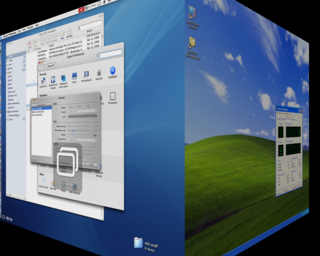
(Of course this doesn't bare too close an inspection, at least on a MacBook, until XP can run at LCD native res).
I've tried to accomplish the cube-transition between fullscreen XP on a virtual desktop with Virtue Desktops. But when I'm in fullscreen XP and hotkey to another desktop, the fullscreen goes away, and XP is windowed again, and the transition fails.
So my question is, for you who have the setup on the screenshot, what settings should be used to accomplish it? I don't really know it it's Virtue, Parallels or both apps settings that are faulty.
Thanks.