Start Vm -> Devices -> CD/DVD ROM -> Connect image -> Machintosh HD -> Library -> Parallels -> tools -> prl_tools_win.iso in case it does not help please try prl_tools_other.iso
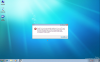
There is no file prl_tools_win.iso or prl_tools_other.iso, there is on the other hand a file called vmtools.iso (which I tried, and it came up with the same error). Also I'm running Parallels 3.
When Win7 boots up, P Tools will try to install. Click Cancel. Go to ''My Computer'' ann Open in a new window the CD/DVD image file of the ptools. whatever the setup file is, run it in compability mode:win xp and admin too.
It worked for me.
It is a pain that i needed to register to aswer the Qs.