Hello,
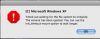
rstill, was the installation of PD successful and it just doesn't launch?
There's a thread
Known Issues and Workarounds for PD with Leopard and there's some similar issue is described. At least, I suppose it's alike.
Unable to launch Parallels Desktop after installing Leopard or Parallels can't find its drivers
1. Reboot your Mac.
2. If the problem still exists, uninstall Parallels Desktop in the following manner:
a. Go to Finder - Applications - Utilities - Terminal.
b. Type and run the following commands:
• sudo rm /System/Library/Extensions/vmmain.kext
• sudo rm /System/Library/Extensions/hypervisor.kext
• sudo rm /System/Library/Extensions/helper.kext
• sudo rm /System/Library/Extensions/ConnectUSB.kext
• sudo rm /System/Library/Extensions/Pvsnet.kext
• sudo rm -rf /Library/Parallels/
• sudo rm ~/Library/Preferences/com.parallels.*
Before you run these commands, please make sure that your VM hdd and pvs files are NOT stored in ~/Library/Parallels.
c. Reboot your Mac and reinstall Parallels.
3. If this does not resolve the issue, please send us the Error message screenshot and logs. To get the logs:
a. Go to Finder - Applications - Utilities - Console.
b. Click Logs in the left upper corner of the Console window.
c. Click ~/Library/Logs and copy all logs from the Parallels folder.
d. Click /Library /Logs and copy the panic logs and parallels logs.
Will it help?
Best regards,
Alicia.