martin@lerchdesign.com
Junior Member
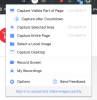
I would like for you to implement a print entire web page feature. Currently you can capture a window, however that hides the contents you have to scroll to. You can select a recording / capture area, and you record / capture the entire screen, but you can't print an entire page in a browser. I use Safari mostly. There used to be a plugin for this called Awesome Screenshot. But now it is only available for Chrome. This extension lets you do a variety of features:
Just to show you, here is a full web page:
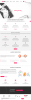
They actually have a plethora of tools in Awesome Screenshot, that come up after the page is captured. Realy nice features. Wished that your paid extension had these features. You should check it out!
https://www.awesomescreenshot.com/
Thank you,
Martin
Just to show you, here is a full web page:
They actually have a plethora of tools in Awesome Screenshot, that come up after the page is captured. Realy nice features. Wished that your paid extension had these features. You should check it out!
https://www.awesomescreenshot.com/
Thank you,
Martin