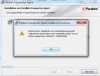
Hi, please check out the following instructions to fix the issue:
1. Start your Windows PC, go to C:\Users\Public\Public Desktop folder
2. Locate Desktop.ini (the file is hidden by default, to unhide it go to Control Panel -> Folder options -> View Tab -> in Advanced settings uncheck Hide protected operation system files (Recommended) ->Apply the settings).
3. Right-click on Desktop.ini file -> open Properties (you should have Administrator privileges) -> uncheck Read-only attribute and save the settings.
4. Reboot your PC, make sure the changes to Desktop.ini made in step 3 are saved.
5. Install Parallels Transporter Agent.