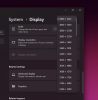
I'm currently using Parallels Desktop for Mac Pro Edition on a MacBook Pro M1 Max w/ 64GB on Mac OS 13.4.
I have an external display connected to my mac, which is an LG Ultrawide 40WP95C-W. Its native resolution is 5120x2160 (which they call a 5k2k). I'm also running the internal display, which I believe is 3024x1964. In Mac OS the displays show in full resolution.
When I'm in Parallels, and I enable full screen mode, the application expands, however the large monitor seems to max out at 4900 x 2612 which isn't even the correct aspect ratio.
Is there a way to tell parallels about the 5k2k format?
I have an external display connected to my mac, which is an LG Ultrawide 40WP95C-W. Its native resolution is 5120x2160 (which they call a 5k2k). I'm also running the internal display, which I believe is 3024x1964. In Mac OS the displays show in full resolution.
When I'm in Parallels, and I enable full screen mode, the application expands, however the large monitor seems to max out at 4900 x 2612 which isn't even the correct aspect ratio.
Is there a way to tell parallels about the 5k2k format?