Run Mac OS High Sierra Beta 4

KaranV

Bit poster
Trying to open Paralells on my MAC running Beta 4 and I get an error, see attached fie. If I go to Security&Privacy under sys-pref there is no "allow" dialogue to enable the app to run. Other Apps I install produce the "Allow" dialogue box to enable that app to run (Third party). Parallels worked fine in Beta 3.
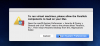
Parallesl_Error.png

Any ideas as to how to resolve this problem.

Thanks
 
Trying to open Paralells on my MAC running Beta 4 and I get an error, see attached fie. If I go to Security&Privacy under sys-pref there is no "allow" dialogue to enable the app to run. Other Apps I install produce the "Allow" dialogue box to enable that app to run (Third party). Parallels worked fine in Beta 3.

View attachment 12733

Any ideas as to how to resolve this problem.

Thanks
  1. Click the Apple menu on your Mac and then select Restart.
  2. Hold down command+R to boot into the Recovery System.
  3. Click on the Utilities menu and choose Terminal.
  4. In Terminal type csrutil disable and press Return.
  5. Close the Terminal app.
  6. Click the Apple menu and choose Restart.
  7. Install or use Parallels Desktop for Mac.
  8. Once the new macOS High Sierra build is released System Integrity Protection must be enabled back.
 
Back
Top