"Scale for menu and title bars"

Yan_Xia

Bit poster
I've installed Ubuntu 14.04.1 LTS on my Macbook Pro 15" with Retina Display with Parallels 10, and enabled Retina resolution. In order to scale up the GUI, I tried to change the settings in "Display" as described here: http://www.itworld.com/software/415502/scale-title-bars-and-menu-ubuntu-1404, but it doesn't change the appearance of Ubuntu at all.

Using the "Tweak tool", I was able to scale up the font size, but the menu and title bar are still very small.

Please let me know if anyone has a fix. Thanks a lot in advance!
 

Attachments
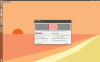
  • Screen Shot 2014-12-07 at 12.26.55 PM.png
    Screen Shot 2014-12-07 at 12.26.55 PM.png
    390.4 KB · Views: 5
Last edited:
Wow. I searched for this issue so many times, even using the phrase: Parallels "Scale for menu and title bars"
Is this forum not indexed by Google or something?
Do the developers read these forums?
This is a very annoying issue for me too. Works fine in VirtualBox. When you update Ubuntu, you will need to reinstall the VirtualBox tools in Ubuntu, then it will continue to work fine.

If you run "unity-control-center" from a terminal, you can see some errors that hint at the issue. Looks like it probably is to do with the virtual display driver not giving appropriate information.

Code:
** (unity-control-center:5515): CRITICAL **: gsd_rr_mode_get_id: assertion 'mode != NULL' failed

** (unity-control-center:5515): CRITICAL **: gsd_rr_mode_get_width: assertion 'mode != NULL' failed

** (unity-control-center:5515): CRITICAL **: gsd_rr_mode_get_height: assertion 'mode != NULL' failed

** (unity-control-center:5515): CRITICAL **: gsd_rr_mode_get_freq: assertion 'mode != NULL' failed
 
Parallels video driver on Linux is still broken (causing this issue) on the latest version: 10.2.0 (28956).
 
Back
Top