Юрий_Романов
Bit poster
Good day to all!
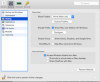
Put it on the Mac Parallels Desktop and faced such a problem. Specify which directories on a Mac to be shared with Win, but the latter does not see them. There is only the C drive and optical drive. What could be the thing that I did wrong?
Put it on the Mac Parallels Desktop and faced such a problem. Specify which directories on a Mac to be shared with Win, but the latter does not see them. There is only the C drive and optical drive. What could be the thing that I did wrong?