After upgrading to Windows 10, using the share bluetooth functionality does not work anymore.
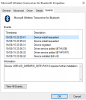
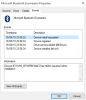
The Microsoft Bluetooth Drivers seem to be installed correctly, however when going to the events tab, it's stated that further installation is required (see screenshots). This occurs both under parallels 10 and today's released 11. With Windows 8/ Parallels 11, everything works fine.
any advice on how to fix this would be greatly appreciated!
The Microsoft Bluetooth Drivers seem to be installed correctly, however when going to the events tab, it's stated that further installation is required (see screenshots). This occurs both under parallels 10 and today's released 11. With Windows 8/ Parallels 11, everything works fine.
any advice on how to fix this would be greatly appreciated!