Don Awalt

Hunter
Parallels 20.0.1; MacBook Pro M3.
I tried multiple DNS servers on the router, all timeout - and this causes web pages to take about 6 seconds to load until the name is resolved/cached. If the router is bypassed and a DNS server is entered directly at the client, it works.

I submitted a technical data report - #471805944
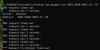
 
So I did some more investigation, this does seem to be a Parallels issue.

Luckily I have 2 VMs, 1 works one does not.
All of this testing is with Shared network source.

On the one that works, an nslookup www.google.com returns as its server prl-local-ns-server.shared, 2001:4860:4802:32::78. So on the VM that fails,
if I type that address in explicitly, it fails:
Screenshot 2024-10-01 at 3.36.18 PM.png

But on the good VM, if I type the routers IPv6 LAN address, it works fine. But on the bad VM, it does not
Screenshot 2024-10-01 at 3.36.18 PM.png

So it seems Parallel's DNS mapping from 2001:4860:4802:32::78 to the router's DNS-IPv6 address is failing somehow. Is this a bug? Misconfigured? Note it is the same IPv6 address on both VMs. Please advise, thanks!
 

Attachments

  • Screenshot 2024-10-01 at 3.40.28 PM.png
    Screenshot 2024-10-01 at 3.40.28 PM.png
    50.9 KB · Views: 3
  • Screenshot 2024-10-01 at 3.40.28 PM.png
    Screenshot 2024-10-01 at 3.40.28 PM.png
    50.9 KB · Views: 3
Any reply Parallels? In summary- using Parallels default dns, the nslookup issue points to what becomes a 6 second delay bringing up a new ip address in a browser. Typing manual dns addresses does not. Parallels dns is broken!
 
Wow 9 months later, never heard a word from Parallels. Nice subscription service.

The last time I checked, yes. I turned off ipv6 then automatic DNS works fine.
 
No. I filed a report though. It can fail in an hour or a day, so it didn't seem like a problem conducive to working out over the phone.
 
Back
Top