[SOLVED] Windows 7: Installation status got stuck, unable to update Windows

YuriC

Junior Member
Parallels Desktop 14
Guests: Windows 7 x64 Ultimate and Professional
Support ID: 295634604
Problem: after Windows installation finished, virtual machine window stays in Installation mode forever (see screenshot)
In this state unable to install Parallels Tools, and Windows Updates exits with the error 80072EE2.
When pressing "Continue Manually..." nothing changes.
There is no problem with Windows DVD, I was testing in Virtualbox, it was successfully installed and updated
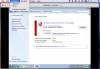
Screen Shot 2019-01-27 at 10.46.10.png
 
UPDATE
My bad, I was testing the installer media on different laptop
When I installed Virtualbox on the same Macbook as Parallels, it suffered the same problem with the Windows Update!
It may narrow the scope of the problem, but I still have no idea, firewall on the Macbook is disabled, nothing prevents installation, it was working fine maybe month ago with the same installer
 
UPDATE
My bad, I was testing the installer media on different laptop
When I installed Virtualbox on the same Macbook as Parallels, it suffered the same problem with the Windows Update!
It may narrow the scope of the problem, but I still have no idea, firewall on the Macbook is disabled, nothing prevents installation, it was working fine maybe month ago with the same installer
Hi YuriC. Please disable/uninstall the Norton antivirus installed on the Mac and try with the installation once again.
 
Thank you Sathiya! I should have checked it first of course.
Norton Security enabled its firewall without any notifications, which I don't need at all (I already use PF+Murus GUI), and blocked Parallels Desktop and other applications.
Hope this solution help other users.
 
Thank you Sathiya! I should have checked it first of course.
Norton Security enabled its firewall without any notifications, which I don't need at all (I already use PF+Murus GUI), and blocked Parallels Desktop and other applications.
Hope this solution help other users.
We are glad to hear that the issue is resolved. Let us know if you face any issues, let us know.
 
Back
Top