Hi,
I'm using macOS 26.0.1 (25A362) on a MacBook Pro with Apple M1 Pro.
Parallels Desktop version: 26.1.1 (57288)
Guest OS: Windows 11 build 26100.4349 (ARM64) -- installed directly through Parallels.
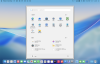
After installation, I didn't modify any settings. When I enabled Coherence Mode, the Start Menu displayed abnormally, as shown in the attached screenshot:
This issue did not occur before, so it might be related to the latest Windows build or a rendering issue in Parallels.
Please help investigate and fix this.
Thanks,
Ryan
I'm using macOS 26.0.1 (25A362) on a MacBook Pro with Apple M1 Pro.
Parallels Desktop version: 26.1.1 (57288)
Guest OS: Windows 11 build 26100.4349 (ARM64) -- installed directly through Parallels.
After installation, I didn't modify any settings. When I enabled Coherence Mode, the Start Menu displayed abnormally, as shown in the attached screenshot:
- The Start Menu appears at the center of the entire Mac screen, instead of staying near the Windows taskbar icon.
- There's a gray ring or shadow around the Start Menu, which never appeared in previous Windows or Parallels versions.
This issue did not occur before, so it might be related to the latest Windows build or a rendering issue in Parallels.
Please help investigate and fix this.
Thanks,
Ryan