start up stalls

STarting up Windows XP stalls and the Mac "rotating radius' (to indicate that the computer is working on something) shows, the computer worms up -although the CPU use only 2.0. And there is not progression.

The problem -apparently- started when I clicked affirmative to the monthly "Check for Update" question.
I reported the problem and received ID 1555610
Could you, please, advise?

Parallels Desktop 5
Mac 10.4.11
 
Hello,

I'm sorry but you were affected with strange problem which i've already seen at several customers - by some reasons strange network services named "PCI Ethernet Slot ^@@^P ^@^A^EA, Port 2 (en1)" presents at your system and prevents PD 5.0 from proper work. To resolve problem please try follow steps:

1. close PD 5.0
2. open Terminal application (/Applications/Utilities/Terminal.app)
3. perform follow commands:

sudo launchctl stop com.parallels.desktop.launchdaemon
sudo rm -f /Library/Preferences/Parallels/network.desktop.xml

4. open System Preferences->Network and find there problem service which named somethig as follow:

PCI Ethernet Slot ^@@^P ^@^A^EA, Port 2 (en1)

5. perform rename service action and apply something more readable: "Adapter 1" for example
6. perfom from Terminal application one more command:

sudo launchctl start com.parallels.desktop.launchdaemon

7. Try to use PD 5.0 again
 
Followed your advice. More instruction is needed

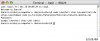
I tried to follow your advice. I attached the copy of the Terminal (it asked for my password and I submitted it).
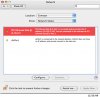
I opened System Preferences>Network. I attached the options I had. I don't see a "name change" option.
Please give me advise!
 

Attachments

  • Parallels 1.jpg
    Parallels 1.jpg
    90.2 KB · Views: 1
  • Parallels 2.jpg
    Parallels 2.jpg
    212.6 KB · Views: 2
i think it's necessary to press "Configure" and necessary action will be there. Just rename service in something human readable and do not change any other settings
 
Back
Top