the MAC address issue, help

W__7

Bit poster
I have installed several virtual machines in Parallels and found that their MAC addresses all start with "00:1c:42". How can I modify the MAC addresses to be completely random?
 
I have installed several virtual machines in Parallels and found that their MAC addresses all start with "00:1c:42". How can I modify the MAC addresses to be completely random?

Hello W__7,

Please be informed that while MAC addresses are automatically generated during your virtual machine's creation, the address can be modified by following the steps outlined below:

  1. Start Parallels Desktop.
  2. Click on the Parallels icon in the Mac menu bar > Control Center > right-click on the virtual machine > Configure.
  3. Click the Parallels Desktop icon in the menu bar and choose Configure.
  4. Click Hardware and then click Network > Advanced.
  5. Type another value in the MAC address field or click the Generate button.
    NOTE: When entering a new MAC address, make sure that it is unique within your network.
 
Hello W__7,

Please be informed that while MAC addresses are automatically generated during your virtual machine's creation, the address can be modified by following the steps outlined below:

  1. Start Parallels Desktop.
  2. Click on the Parallels icon in the Mac menu bar > Control Center > right-click on the virtual machine > Configure.
  3. Click the Parallels Desktop icon in the menu bar and choose Configure.
  4. Click Hardware and then click Network > Advanced.
  5. Type another value in the MAC address field or click the Generate button.
    NOTE: When entering a new MAC address, make sure that it is unique within your network.
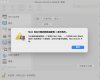
thanks for your reply. I did as you said, actually I operated it this way before.
for example, the current mac address is 00:1C:42:05:75:e3, if i change it to 01:1C:42:05:75:e3, my request will be refused, and a message shows: ... start with 001c42.
 

Attachments

  • 截屏2023-09-03 16.40.14.jpg
    截屏2023-09-03 16.40.14.jpg
    127.4 KB · Views: 8
Back
Top