The virtual Hard Disk 0 has wrong access permissions

SteveB3

Bit poster
I am having a heck of a time getting any response from Parallels Support. Hopefully someone in here can help???

Product : Parallels Desktop
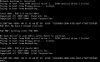
Problem description : I was loading the program today for the first time in a week or so and the program took a long time to boot. I then did a force quit on Parallels and then upon reboot, I got the following popup messages.
"The virtual Hard Disk 0 has wrong access permissions or is used with another virtual machine."
When I click "OK" then I get the next popup message stating
"Unable to connect Hard Disk 0

 

Attachments

  • pd1_2015-08-21_17-27-53.jpg
    pd1_2015-08-21_17-27-53.jpg
    60.3 KB · Views: 67
  • pd2_2015-08-21_17-28-31.jpg
    pd2_2015-08-21_17-28-31.jpg
    77.1 KB · Views: 60
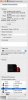
Tried it, didn't change anything. Still get error. I have attached some new screenshots. As you can see, I originally installed this virtual machine into the Shared folder so this should not have even been an issue. But just in case, I followed your instructions for the sharing and permissions. Still no effect. What next?
 

Attachments

  • Parallels Picture.png
    Parallels Picture.png
    10.4 KB · Views: 46
  • Parallels Windows 7 PVM Info.jpg
    Parallels Windows 7 PVM Info.jpg
    204.9 KB · Views: 48
  • Parallels Windows 7 PVM path.jpg
    Parallels Windows 7 PVM path.jpg
    303.8 KB · Views: 41
Tried it, didn't change anything. Still get error. I have attached some new screenshots. As you can see, I originally installed this virtual machine into the Shared folder so this should not have even been an issue. But just in case, I followed your instructions for the sharing and permissions. Still no effect. What next?
Thanks for the provided info, could you please also generate the problem report using this KB and reply us back with the report 8-digit ID number.
We need it for more tech.info.
 
so the error in report says that image is used by another process. I'd like suggest the following (the commands will set correct owner, give full access permissions and remove lock flags if any):

1. Reboot Mac
2. Open Terminal (/Applications/Utilities) and execute the following commands one by one
sudo chmod -R 777 /Users/Shared/Parallels/Windows\ 7.pvm/
sudo chown -R sbaker2:staff /Users/Shared/Parallels/Windows\ 7.pvm/
sudo chflags -R nouchg /Users/Shared/Parallels/Windows\ 7.pvm/
sudo chflags -R noschg /Users/Shared/Parallels/Windows\ 7.pvm/
3. Open VM config (http://kb.parallels.com/en/117287 ) > Hardware > make sure hdd is connected (checkbox is ticket).

another thing you can try is to map virtual disk to another vm: http://kb.parallels.com/en/121578
 
I had the same problem. The only way I was able to fix it was by removing the folder named "Windows Disks" inside the .pvm folder (it's recreated automatically later).
 
I have exact same issue, didn't resolve any with #7's instruction, nor removing "Windows Disks" inside the .pvm folder. I am now doom that i can't work through my windows....

my Request ID: 222418171
 
I am trying to restart my VM after following the instructions (http://kb.parallels.com/en/112609) to manually install parallels tools. The reason I needed to do this is I've lost keyboard access to Modern Apps and this was one of the suggestions.

I tried one of the suggestions above to reset ownership/permissions:-
$ sudo chmod -R 777 "/Users/Shared/Parallels/Windows 10 Pro.pvm"
$ sudo chown -R {username}:staff "/Users/Shared/Parallels/Windows 10 Pro.pvm"
$ sudo chflags -R nouchg "/Users/Shared/Parallels/Windows 10 Pro.pvm"
$ sudo chflags -R noschg "/Users/Shared/Parallels/Windows 10 Pro.pvm"​
but that hasn't worked.

A technical report with the ID number 236352930 has been sent to Parallels.
 
Last edited:
I tried many things found here and there.
In addition to that, after I ran Onyx to clean up Mac, the Parallels VM started to boot correctly.
I'm not sure exactly what worked, but I'm posting this as it might help someone.
 
No one from Parallel ever reply this issues, clearly it doesn't just happen to one, but couple people already. My solution is to switch to VMware software to fully resolve my problem.
 
I tried many things found here and there.
In addition to that, after I ran Onyx to clean up Mac, the Parallels VM started to boot correctly.
I'm not sure exactly what worked, but I'm posting this as it might help someone.

X2 for OnyX. Tried everything here as well as Mac OS instructions but the only one that solved the issue was OnyX.
 
I am having similar issues but need help to complete the solution. Seem permissions were corrupted after a power failure. Only solution that somewhat worked was to remove "Windows Disks" folder. It did restart after this but extremely slowly (3-4 min to boot), and the "Windows Disks " folder was not regenerated. Very bad performance now. ideas? DO i put the old folder back?
 
In case anyone is still having permissions issues this fixed it for me.
https://kb.parallels.com/en/117667 basically sudo su / chmod -R -N [VMName] ina terminal.

I had the issue when copying my VM from a Time Machine backup directly to my machine as I wanted it in a different folder, TM must change the permission when creating the backup.

Hopes this helps for anyone with the permissions issue it was driving me nuts!
 
Back
Top