
I'm stumped. I've used Parallels on my Mac for years without any major issue, but something new has popped up that I can't figure out. I have a 2017 Mac running current version of Mojave and am running Parallels/Windows 10, which I keep updated. Windows is primarily used only for Quicken. I use the latest version of "Office for Mac" on the Mac side.
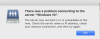
A couple weeks ago, I started getting this error message when opening any Office files (Excel, Word, etc) - "There was a problem connecting to the server 'Windows 10'. The server may not exist or it is unavailable at this time. Check the server name or IP address, check your network connection, and then try again." I get this error message whether or not I have Parallels/Windows 10 running at the time or not.
Does anyone have an idea as to what may be happening, or where to look for clues?
Thank you,
Kipa
A couple weeks ago, I started getting this error message when opening any Office files (Excel, Word, etc) - "There was a problem connecting to the server 'Windows 10'. The server may not exist or it is unavailable at this time. Check the server name or IP address, check your network connection, and then try again." I get this error message whether or not I have Parallels/Windows 10 running at the time or not.
Does anyone have an idea as to what may be happening, or where to look for clues?
Thank you,
Kipa
