My latest Parallels Desktop 6 for Mac update (to build 6.0.11826 Rev 611899, Oct 19) did not appear to install Tools when I started Windows 7 (64 bit).
I can't select Coherence mode although Desktop 6 indicates Tools are installed (bottom left corner).
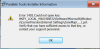
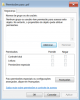
However, when I try to reinstall Tools I get Error 1402: (Could not open key: HKEY_Local_Machine32\Software\Microsoft\Windows\CurrentVersion\InternetSettings\ZoneMap\Domains\psf). I also get a similar error when I try to uninstall Tools via the Control Panel facility. The psf registry entry referred to in the error message does not exist. Also there is no Parallels folder in C:\Program Files.
On my Windows 7 (64 bit installation) there are no registry entries beginning HKEY_Local_Machine32 but there are entries beginning HKEY_Local_Machine.
When I try to uninstall Tools, I also lose all the the psf network file references and cannot see my files on the Mac. To get out of this I had to restore 22GB PVM from my Time Machine from a configuration before installing Desktop ver 6 - takes ages especially as I have now had to do this several times!
I have tried reinstalling Desktop 6 (over previous version) but am reluctant to rebuild my Windows 7 virtual machine as this will take a very long time.
Any ideas to help?
I can't select Coherence mode although Desktop 6 indicates Tools are installed (bottom left corner).
However, when I try to reinstall Tools I get Error 1402: (Could not open key: HKEY_Local_Machine32\Software\Microsoft\Windows\CurrentVersion\InternetSettings\ZoneMap\Domains\psf). I also get a similar error when I try to uninstall Tools via the Control Panel facility. The psf registry entry referred to in the error message does not exist. Also there is no Parallels folder in C:\Program Files.
On my Windows 7 (64 bit installation) there are no registry entries beginning HKEY_Local_Machine32 but there are entries beginning HKEY_Local_Machine.
When I try to uninstall Tools, I also lose all the the psf network file references and cannot see my files on the Mac. To get out of this I had to restore 22GB PVM from my Time Machine from a configuration before installing Desktop ver 6 - takes ages especially as I have now had to do this several times!
I have tried reinstalling Desktop 6 (over previous version) but am reluctant to rebuild my Windows 7 virtual machine as this will take a very long time.
Any ideas to help?