Trying to disable "Wi-fi sense" in Windows 10 but I don't see it at all

snsokstan

Member
Following the advice seen on many posts, I went into Windows 10 > Settings > Network, but "manage Wi-Fi networks" is not listed there. Is that something that's disabled when Parallels manages Windows? I am running the latest version of Yosemite and have a purchased downloaded version of Win 10, and it's fully updated.

Ideas?
 
Following the advice seen on many posts, I went into Windows 10 > Settings > Network, but "manage Wi-Fi networks" is not listed there. Is that something that's disabled when Parallels manages Windows? I am running the latest version of Yosemite and have a purchased downloaded version of Win 10, and it's fully updated.

Ideas?
Hi please try the following:
Before making any changes please take a snapshot of your VM (actions -> take a snapshot)
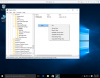
1. Start your VM and in the search box type "regedit" (without qoutes) -> then on the top of the list please right click on the "Regedit" and choose run as administrator
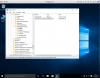
2. In the regedit window please open the following folder:
HKEY_LOCAL_MACHINE\SOFTWARE\Microsoft\WcmSvc\wifinetworkmanager\config\
3. Click on the Config folder -> go to the right window -> right click on the blank place and choose New -> DWORD Value
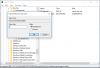
4. Then the New Value appears please change name to -> AutoConnectAllowedOEM
5. Double click on it and set the Value to 0
Please use the screenshots for more info.
 

Attachments

  • Screen Shot 2015-09-18 at 10.53.05.png
    Screen Shot 2015-09-18 at 10.53.05.png
    282.7 KB · Views: 3
  • Screen Shot 2015-09-18 at 10.53.47.png
    Screen Shot 2015-09-18 at 10.53.47.png
    283.7 KB · Views: 3
  • Screen Shot 2015-09-18 at 10.54.06.png
    Screen Shot 2015-09-18 at 10.54.06.png
    61.8 KB · Views: 3
Back
Top