Unable to connect Hard Disk 1

uses

Bit poster
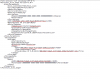
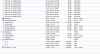
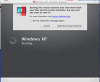
One day my VM crashed. When I reboot, an alert message popped up "Unable to connect Hard Disk 1".
Attached are some screencaps.

I have tried the solution http://kb.parallels.com/en/4680 but didn't help.
When I tried to repair the installation of Windows XP in Virtual Machine, it say the hard disk was not connected even I checked to connect in the virtual machine setting.

Much appreciate for any help since I have a lot of important data in the hard disk. Thanks.
 

Attachments

  • Screen Shot 2016-10-21 at 2.22.08 PM.png
    Screen Shot 2016-10-21 at 2.22.08 PM.png
    49 KB · Views: 35
  • Screen Shot 2016-10-21 at 2.22.29 PM.png
    Screen Shot 2016-10-21 at 2.22.29 PM.png
    69.6 KB · Views: 33
  • Screen Shot 2016-10-21 at 2.21.51 PM.png
    Screen Shot 2016-10-21 at 2.21.51 PM.png
    139.2 KB · Views: 35
  • Screen Shot 2016-10-21 at 2.20.59 PM.png
    Screen Shot 2016-10-21 at 2.20.59 PM.png
    351.6 KB · Views: 41
Hello uses, please try this solution and let us know if that makes any changes.
 
Thanks for your help.
Finally I make it work after referring to this post:
https://forum.parallels.com/threads/cant-connect-to-hdd-after-migration-to-new-mac.104014/

Duplicate the .hdd, select the duplicate, Get Info, right click the duplicate, select show package contents, select all files, Get Info, check permissions in all the Get Info windows to make sure you have read/write access. Remove the old hdd from the virtual machine configuration. Add the duplicate .hdd to the virtual machine setup.

But I am not quite understand the reason why copying the old hdd could make this work. Appreciate if you could let me know more.
 
Thanks for your help.
Finally I make it work after referring to this post:
https://forum.parallels.com/threads/cant-connect-to-hdd-after-migration-to-new-mac.104014/

Duplicate the .hdd, select the duplicate, Get Info, right click the duplicate, select show package contents, select all files, Get Info, check permissions in all the Get Info windows to make sure you have read/write access. Remove the old hdd from the virtual machine configuration. Add the duplicate .hdd to the virtual machine setup.

But I am not quite understand the reason why copying the old hdd could make this work. Appreciate if you could let me know more.
Thanks for sharing this.
 
Back
Top