AnthonyS22
Bit poster
Hi there friends! I updated to the latest version of Parallels and I also reinstalled Windows 10 because I was having some issues with speed and consistency.
After the update and reinstall I am struggling to figure out how to get Windows 10 to scale when in windowed mode (It used to scale when dragging the corner regardless of what the desktop resolution was.)
Am I missing something here? Can anyone help explain it to me?
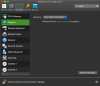
The first screenshot (dark mode) shows what I am currently seeing - no setting for scaling.
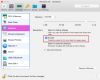
The second screenshot (light mode) shows what I see on the help website (https://kb.parallels.com/en/123951) describing how to set up the scaling in a prior version of the app.
After the update and reinstall I am struggling to figure out how to get Windows 10 to scale when in windowed mode (It used to scale when dragging the corner regardless of what the desktop resolution was.)
Am I missing something here? Can anyone help explain it to me?
The first screenshot (dark mode) shows what I am currently seeing - no setting for scaling.
The second screenshot (light mode) shows what I see on the help website (https://kb.parallels.com/en/123951) describing how to set up the scaling in a prior version of the app.