
I just installed the Parallels v3.0 5584 trial on my brand new 8-Core Mac Pro and I'm having difficulty loading my boot camp partition.
Whenever I try to load it I get the following message
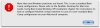
"More than on Windows partitions are found. This is not a standard Boot Camp configuration."
I've only ever created one partition on this computer (it's about a week old) and I'm not sure what is causing this error.
The install of Windows XP on my boot camp partition loads fine in "boot camp" mode, and it all seems to load without any problems in the trial version of VM Ware.
Is there something I can do to fix this, or is it a compatibility issues with the new Mac Pros?
Whenever I try to load it I get the following message
"More than on Windows partitions are found. This is not a standard Boot Camp configuration."
I've only ever created one partition on this computer (it's about a week old) and I'm not sure what is causing this error.
The install of Windows XP on my boot camp partition loads fine in "boot camp" mode, and it all seems to load without any problems in the trial version of VM Ware.
Is there something I can do to fix this, or is it a compatibility issues with the new Mac Pros?
 Thanks.