Make Windows only USB devices to work in Windows on ARM (e.g. VCDS Scanner)

VCDS usb support for Parallels Desktop - vote here!

  • This is useless

    Votes: 0 0.0%

  • Total voters
    12

PSG

Member
Hi, I use VCDS scanner, a USB device in windows10 (also in normal boot camp). This is a kind of car diagnose scanner. This scanner works with standard usb bridge drivers, nothing special, it's even doesn't need COM port emulation. After drivers is installed in windows, it's located only in usb section in device manager.
I use virtualBOX to run VM with win10 on mac and this driver works there, but i found your coherence mode really pleasant so I wish to switch to Parralles Desktop. Anyway please take a look on that numbers: many enthusiast and many pro users of VCDS have got Macs so if you'll make this driver mountable in Paralles Desk total amount of new licence will rise. This is best time for this kind of feature when new Macs with M1 can't work in boot camp so the only way would be Paralles Desktop VM emulation in new windows ARM.
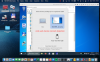
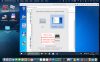
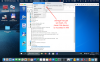
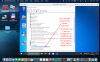
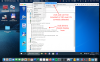
I attached lower, some pictures where you can see that Parallels Desktop correctly detect storage device and mount it into VM, also it detect VCDS device but mounting is not possible to be don. I attached a link to usb device drivers if you need to check them.
https://www15.zippyshare.com/v/HCSJ6mok/file.html
 

Attachments

  • vcds_usb_device_cant_be_mounted_in_VM.png
    vcds_usb_device_cant_be_mounted_in_VM.png
    792.5 KB · Views: 128
  • vcds correct detection.png
    vcds correct detection.png
    715.2 KB · Views: 116
  • usb_storage_detect_and_mount_OK_in_VM.png
    usb_storage_detect_and_mount_OK_in_VM.png
    721.4 KB · Views: 120
  • storage_with_set_mark.png
    storage_with_set_mark.png
    788.2 KB · Views: 116
  • storage_mounted_and_listed.png
    storage_mounted_and_listed.png
    790.7 KB · Views: 115
There should be also option for mounting standard usb->COM Port drivers, FTDI, Prolific 2303 etc this is standard normal usb com port driver. It's sad it's not implemented in Parallels Desktop
 
I know you probably will not buy vcds just for testing - anyway this Company could give you a free sample if theirs products would be implemented in PD16 - so you can use any kind of cheap FTDI usb com port dongle. I pretty sure if you enable mounting for such device, my vcds will work too.
 
I found new lines in dispatcher.desktop.xml file, what other types of USB means?
<UsbType>13</UsbType> type 13 I guess it's storage ( pendrive? )so maybe we could force PD16 to mount our usb com port devices using some other type of usb ? usb-LAN rj45 on AXIS chipset also doesn't work but this could be useless due to internal network driver used mac LAN
Code:
 <UsbIdentity dyn_lists="Association 0" id="1">
               <SystemName>VIRTUAL@MSC@41f0435trgdew34ret4ec0a10fe33f|203a|fff7|unknown|--|41f0cac934rtedqw345rtfd54542q54w10fe33f@/dev/disk2</SystemName>
               <FriendlyName>SEMC SD CCR-80 Media (disk2)</FriendlyName>
               <Index>1</Index>
               <UsbType>13</UsbType>
               <AssociationsNew dyn_lists="Association 0"/>
            </UsbIdentity>
            <UsbIdentity dyn_lists="Association 0" id="2">
               <SystemName>14100000|0403|fa24|full|--|RT000001</SystemName>
               <FriendlyName>Ross-Tech HEX-USB</FriendlyName>
               <Index>1</Index>
               <UsbType>0</UsbType>
               <AssociationsNew dyn_lists="Association 0"/>
            </UsbIdentity>
            <UsbIdentity dyn_lists="Association 0" id="3">
               <SystemName>d100000|0b95|1790|super|--|00000000000049</SystemName>
               <FriendlyName>AX88179</FriendlyName>
               <Index>1</Index>
               <UsbType>0</UsbType>
               <AssociationsNew dyn_lists="Association 0"/>
            </UsbIdentity>
 
new PD version 16.1.249151 with new parallels tools didn't fixed this issue, still only usb storage devices can be mounted to VM
 
finally I've got answer for my support ticket from Parallels Desktop support Team:
Hello, Thank you for your patience and cooperation while we are working on the resolution. USB-to-com or USB-to-lanRJ45 devices are not supported with Parallels Desktop. If you need further assistance, you can reopen the ticket within 14 days by simply replying to this message. Please let us know if you have any additional questions. We appreciate your time and consideration. Thanks, Sakthi Sowmiya Customer Support

This is clear statement that PD16 is useless for You if you wish to use other usb device than storage pandrive. Move to VirtualBox, we don't need you but anyway we will not give you money back.
 
there is no problem with all type of devices in free FUSION 12.1.0
 

Attachments

  • vmware_fusion_work_with_usb_devices_ok.png
    vmware_fusion_work_with_usb_devices_ok.png
    769.3 KB · Views: 78
Wow, that is a very strange reaction from Parallels. Shame on them. I use an older MacBook for VCDS with Parallels 16, that works perfect. (Catalina) with VCDS and coherence mode. Why would they leave it out of the version for Big Surr?
 
probably they will make it "in future" until this time I recommend free Fusion 12.1.0
problem lies in KEXT drivers which should be rewritten to DEXT version
 
WTF Parallels?????
We need access to USB devices. This is absurd.
My programming computer now is f'ing worthless.
I use this from a MAC to program network and control systems devices.
This needs to be addressed immediately. I lose money every day that I cannot program and I hold you responsible.
 
Final conclusion:
in PRO/Standard version mounting of other than storage usb device works OK because this window shows up and you can click ALLOW or NOT
in business version this window doesn't show up so only default device like storage usb would be mounted
the question is:
Why business version is cut from important feature ?
 

Attachments

  • parallels PRO usb works.jpg
    parallels PRO usb works.jpg
    854.7 KB · Views: 102
I also use Parallels for my VCDS scanner and can not get it to work on PD 16.1.2 with Big Surr.
Can you see the USB type in the dispatcher.desktop.xml file for the VCDS scanner with Parallels Standard version?
 
there is no changes in dispatcher XML file when vcds cable is mounted in VM windows but as I told before, there will be additional window displayed when you plug in vcds usb cable to usb port and after you will confirm access to ross-tech usb cable it will be mounted. Suddenly this additional windows doesn't show up in business edition
lower it's a part from dispatcher xml file from PD 16.1.2.49151, and as you can see there is a type 0 same as before
Code:
<UsbIdentity dyn_lists="Association 0" id="2">
               <SystemName>14100000|0403|fa24|full|--|RT000001</SystemName>
               <FriendlyName>Ross-Tech HEX-USB</FriendlyName>
               <Index>1</Index>
               <UsbType>0</UsbType>
               <AssociationsNew dyn_lists="Association 1"/>
            </UsbIdentity>
 
Maybe support could help us to fix issue with mounting usb other than storage in business version, but I think they will not do it for sure.
 
there is no changes in dispatcher XML file when vcds cable is mounted in VM windows but as I told before, there will be additional window displayed when you plug in vcds usb cable to usb port and after you will confirm access to ross-tech usb cable it will be mounted. Suddenly this additional windows doesn't show up in business edition
lower it's a part from dispatcher xml file from PD 16.1.2.49151, and as you can see there is a type 0 same as before
Code:
<UsbIdentity dyn_lists="Association 0" id="2">
               <SystemName>14100000|0403|fa24|full|--|RT000001</SystemName>
               <FriendlyName>Ross-Tech HEX-USB</FriendlyName>
               <Index>1</Index>
               <UsbType>0</UsbType>
               <AssociationsNew dyn_lists="Association 1"/>
            </UsbIdentity>

While i have the NEED for USB devices to connect due to the reason being I need the USB Blaster to be connected to windows, so I can Finish a COURSE that i am taking at the university.
I have the business version of parallels, and i have also noticed, that, when I created a new account for the trial version of the standard/Pro Version.
I did notice the same thing about the pop-up coming up.

One thing that I did try thoguh, was that I went to parallels>Preferences>USB BLASTER Set it to only run on Windows.
However, when I switched back to the enterprise, edition.

I have noticed one thing. Which is that, everytime I switch between different editions, it installs the parallels tools on my windows again. Which makes me wonder if there are different parallels tools for the pro/Standard edition vs bussiness edition?
If so, would we be able to solve the issue, by just installing parallels tools from the standard/pro edition
 
I had business edition and tools installed from business edition in VM win10, than I install trial pro version without reinstalling tools from pro and USB worked.
This is something else fixed in pro version to bring that popup window
 
Back
Top