USB Multimedia can't connect

baxlobs

Bit poster
I have installed Win XP via Parallels 8 so as to run some legacy Windows programs with no direct Mac equivalents.

One of these is a Navigation program, PC Planner, which uses C-Map charts. The program installed just fine, the problem is that the USB Multimedia reader which the chart chip plugs into is just not recognised. When I connect it an error message pops up.

"Unable to connect the USB device to the virtual machine. The device cannot be connected now. Please try again later." There is an error code id471. Clicking this leads to a page on the Parallels website concerning trying to load Win 8 from a USB stick, so not a similar problem at all.

Has anyone managed to use this program/card reader or does anyone have any suggestions?
 
I thought I should update this, obviously no-one else has tried to use this device.

I had a support session with a very helpful guy from Parallels today, it is clear from that, that the problem lies with the incompatibility of the device with Mac OS X.

The Mac cannot recognise it so it is not available to Windows in Parallels.

I am next going to try setting up Windows XP via Bootcamp, hopefully it should work when I boot directly to Windows?
 
Hi Baxlobs,

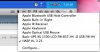
When you run your Virtual Machine and plug in your USB device, can you see it in the list of USB devices in Devices > USB?
 
Hi Andrew,

Yes, when it is plugged in, it is visible as "Vendor OCD2 - Vendor Specific hash 3" (There is no hash key on my keyboard!)

However when I click on this item, I get the error message "Unable to connect this device to the virtual machine."

A helpful guy from Parallels support spent a lot of time online trying to sort this, but concluded that it was a basic hardware incompatibility issue. The device is hardwired to work with a Windows PC, and is just not recognised by Mac OS X.

If you have further suggestions I would be most grateful.
 
I need a bit more details to bring it over to development.

Please follow these steps:
1. Send me the exact version/manufacturer of your USB Multimedia reader
2. Click on Parallels Desktop > Preferences > Advanced and check "Use detailed log messages"
3. Reproduce the problem. When you see the error message coming up, click on Help > Report a Problem. Post the ID here.
4. Disable detailed log messages.
 
My PC USB Multimedia can't connect

I have installed Win XP via Parallels 8 so as to run some legacy Windows programs with no direct Mac equivalents.

One of these is a Navigation program, PC Planner, which uses C-Map charts. The program installed just fine, the problem is that the USB Multimedia reader which the chart chip plugs into is just not recognised. When I connect it an error message pops up.

"Unable to connect the USB device to the virtual machine. The device cannot be connected now. Please try again later." There is an error code id471. Clicking this leads to a page on the Parallels website concerning trying to load Win 8 from a USB stick, so not a similar problem at all.

Has anyone managed to use this program/card reader or does anyone have any suggestions?
 
Last edited by a moderator:
Is your VM on and running when you insert the usb dongel or are you opening/starting the VM with the dongel inserted?
 
I use a dongle that is never recognized by my mac. This worked for me on my imac and mac book air.
Please try this:

(Please make sure you have Parallels tools installed in vm)
Insert usb dongle
Turn VM on
Check to make sure dongle is in the list of usb devices
select it so that there is a check next to it (let xp vm search for drivers and install them).
Eject dongle from vm then remove from mac
restart vm
insert dongle
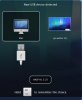
The mac pop-up New USB device detected should pop up
select VM

The USB dongle never appears on my mac as a device.
kat
 

Attachments

  • screen-capture-3.jpg
    screen-capture-3.jpg
    31.8 KB · Views: 5
  • screen-capture-4.jpg
    screen-capture-4.jpg
    43.3 KB · Views: 5
Last edited:
I use a dongle that is never recognized by my mac. This worked for me on my imac and mac book air.
Please try this:

(Please make sure you have Parallels tools installed in vm)
Insert usb dongle
Turn VM on
Check to make sure dongle is in the list of usb devices

select it so that there is a check next to it, ......done this got check mark
(let xp vm search for drivers and install them). ......This is when the error message appears.
Eject dongle from vm then remove from mac ..... Don't see how to "eject" all I could do was "uncheck" in Devices
restart vm
insert dongle
The mac pop-up New USB device detected should pop up
select VM ........The error message comes up again. No progress I'm afraid

The USB dongle never appears on my mac as a device.
kat

Thanks for your reply, see my comments after the ..... against the steps in your suggested actions.

Nothing seems to have changed.
 
Back
Top