
jmirabella
Bit poster
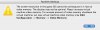
Recently ( nothing has changed on my system ) I started getting a pop up while entering coherence mode, that I need to raise my video memory in my Parallels Preferences.
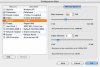
I have always left it at 8mb.. is this a bug of some sort? I have rebooted many times and changed settings.
I have set it up all the way to the max video memory and it still doesnt resolve this.. all of the parallels advanced video stuff, shading, transitions, etc are off
using a Macbook pro 15" - 128mb video ram core 2 duo model with 2gb system ram.. latest beta of Parallels
I have always left it at 8mb.. is this a bug of some sort? I have rebooted many times and changed settings.
I have set it up all the way to the max video memory and it still doesnt resolve this.. all of the parallels advanced video stuff, shading, transitions, etc are off
using a Macbook pro 15" - 128mb video ram core 2 duo model with 2gb system ram.. latest beta of Parallels
Attachments
Last edited:
