I have a number of virtual machines I use for software testing. Each has a different configuration (for example, I have one install with WinXP and IE 7, one with WinXP and IE 8, one with Win7 and IE 8, and so on). I added another configuration today, and now the list is off the bottom of my screen. I can still see the top of the just-added VM, but not the whole thing, and certainly my next configuration will be totally invisible.
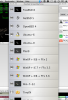
I've attached a cropped screenshot showing the problem. The screenshot is only cropped horizontally; that's the full height of my desktop.
Am I missing something? Can the entries be made shorter? Can the list be made to scroll?
I've attached a cropped screenshot showing the problem. The screenshot is only cropped horizontally; that's the full height of my desktop.
Am I missing something? Can the entries be made shorter? Can the list be made to scroll?