Virtual machine not pausing automatically

YuvalB1

Junior Member
Hey,
I use Parallel a few weeks already, and each time I stopped using at windows, after a few short minutes the virtual machine pausing automatically.
However, in recent days, the virtual machine isn't pausing automatically, even if i didn't work with windows a lot of time.
The setting option to stop the virtual machine is on, but it is not happening.
How do I return the setting to pause the virtual machine automatically?
Thanks for the help,
Yuval
 
Actually, I'm sorry but the problem still persists.
If I work for a few minutes with Parallel, the virtual machine pausing automatically, but when I work with Parallel continuously for several hours (2-3 hours), the problem continues and the virtual machine doesn't stop automatically.
Why its happen?
 
Hello Friends
I didn't work with windows a great deal of time. I give back the setting to stop the virtual machine consequently.
 
I am not sure if i understand what you mean. Did you mean that I should cancel the option "pause windows when possible" and then return the option? Because if so, then I did it and it still doesn't work.
 
Actually, I'm sorry but the problem still persists.
If I work for a few minutes with Parallel, the virtual machine pausing automatically, but when I work with Parallel continuously for several hours (2-3 hours), the problem continues and the virtual machine doesn't stop automatically.
Why its happen?
Hi, the behavior is controlled by your Windows' power scheme. The idea behind this is battery power saving. The VM will pause itself after a short period of inactivity for battery power saving.
You can control this period in Start->Settings->Control Panel->Power Options. If you do not want windows to pause anymore, just set "System Standby" to "Never"
 
I didn't make any changes on windows settings since the installation. Anyway, the sleep setting was on "never", so i changed it to only one minute and yet nothing has changed. The virtual machine does not pause automatically.
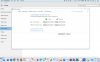
Even I have attached a picture.
 

Attachments

  • Power saver windows 10.png
    Power saver windows 10.png
    198.3 KB · Views: 3
I don't believe how damage you've done! I do not have the time and ability and understanding to deal with this!

I must must must that someone of you will chat with me online as quickly as possible to solve it!
 
Last edited:
Back
Top