Virtual Memory Setting - Optimum

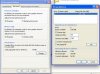
I often get a message in XP that my virtual memory is too low and that I might experience delays. I open the memory panel and it is contradictory. First, it says the VM is 54 megs. But then when I see the detail of that setting, it is clear (i think) that I have set it to 54 to 768 megs. Also, I have set the total memory on parallels to 512 megs. I had set it higher earlier, but I lowered it because I didn't see any improvement for setting higher.

Is there something I should do that would make it better?
 

Attachments

  • Picture 2.jpg
    Picture 2.jpg
    19.7 KB · Views: 9
An old rule of thumb (most famously posted on the Adobe website for Photoshop users) is NEVER let Windows manage the virtual memory. The other thing posted was a minimum value for virtual memory should be 2x -> 3x physical memory...

In your case - set the minimum and maximum to the same value (your current 768MB maximum), or even slightly bigger (say 1024MB) as you state you have given XP 512MB of memory for the VM.

Post up a reply and let us know how you go...
 
I experienced what I think was a good update to Parallels Build 5582, but immediately began to get the same virtual memory message you cite. That never happened before, and I’ve changed nothing that should make it happen. I’m now finding slower start-ups and accessing of programs in Windows. (By the way, I use all of about two small programs in Windows.)

I’m not running on Boot Camp. This is a straightforward VM using XP SP2 on Tiger (10.4.11.) I have 3 GB of memory in my iMac 20-inch Intel machine. Are there preference defaults in Parallels I should use? Changes in configuration? Suggestions? I use Windows solely for work and can’t afford any sudden collapses.

Thanks for any advice.

I often get a message in XP that my virtual memory is too low and that I might experience delays. I open the memory panel and it is contradictory. First, it says the VM is 54 megs. But then when I see the detail of that setting, it is clear (i think) that I have set it to 54 to 768 megs. Also, I have set the total memory on parallels to 512 megs. I had set it higher earlier, but I lowered it because I didn't see any improvement for setting higher.

Is there something I should do that would make it better?
 
Last edited:
Yes, right after I made the successful upgrade -- following directions precisely (repairing permissions, restarting, etc) -- I then compressed the VM. I had to delete two snapshot VMs, which took awhile, but everything seemed to go just fine.


Lbelg did you compress your vm?
 
That why you get the message.....

right click on my computer...advanced...performance...advanced.....virtuel memory...change

768 begin 1535 max fill this in and apply.

Each time you compress you have to change virtual memory.

Greetings.

From Belgium????
 
Im not quite sure I understand. The virtual memory panel in Windows shows that my initial size is 50. The maximum size is showing at 768. Are you saying I should change both values so that initial is 768 and maximum is 1535?

(Also, how come I didnt have to do anything in Windows when I initially installed Parallels?)

Nope. Not from Belgium. <g>
 
Thanks, Jackybe67. I did as you suggested, then restarted my VM. I didn’t do much to test it, but I was getting the message right away and this time I didn’t. I hope Parallels incorporates that little tidbit into its manual or FAQ section at some point.
 
Back
Top