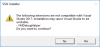
I checked VMDebugHelper on Visual Studio 2017 (Community edition) and see same warning message on installation, but after all setup steps it fully worked.
Make sure all conditions are met:
The virtual machine with Visual Studio and other virtual machines must belong to the same pool of IP addresses, or just configured to use the shared network.
The virtual machine with Visual Studio and other virtual machines must have same platform (x86 or x64).
All virtual machines must have Parallels Tools installed.
The virtual machine with Visual Studio must have the Access Windows folders from Mac option selected.
Other virtual machines must have the Share Folders: All disks option selected.
The user accounts logged in to the virtual machines in which you're going to test your project must have both username and password and you must know them.