I suffered a crash on my macbook pro and noticed for starters when I turned it on my dock changed back to the beginning settings. All my programs and everything was there but it responded as loading up for the first time. When I started up parallels, it showed the screen as if it has not been used before. So, I tried the custom installation to see if it would identify the .hdd file and possibly get going. It stops after a couple of seconds when I see a brief blue screen hard drive error and then I see the safe mode options. When I try to click on any of them, it doesn't do anything. So at this point, do I have other options or is it a goner? Can the hard drive be saved?

Install the app
How to install the app on iOS
Follow along with the video below to see how to install our site as a web app on your home screen.
Note: This feature may not be available in some browsers.
You are using an out of date browser. It may not display this or other websites correctly.
You should upgrade or use an alternative browser.
You should upgrade or use an alternative browser.
VM disappeared and hdd not working
- Thread starter sounder19
- Start date
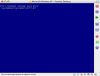
I did try that article already with no success. I did a custom install to get a chance to try the new file and the error message came up.
STOP: c0000221 Unknown Hard Error
\SystemRoot\System32\ntdll.dll
I am using Desktop for Mac 3.0 build 5160 and Mac OS 10.4.11
STOP: c0000221 Unknown Hard Error
\SystemRoot\System32\ntdll.dll
I am using Desktop for Mac 3.0 build 5160 and Mac OS 10.4.11
Hello,
please try to create a Custom VM with 'Do not add any hard disk' option.
Then open Configuration Editor of new VM and add a hard disk (your .hdd file).
Try to start this VM.
Also you can try to repair your Windows Installation.
Best regards,
Stacey
please try to create a Custom VM with 'Do not add any hard disk' option.
Then open Configuration Editor of new VM and add a hard disk (your .hdd file).
Try to start this VM.
Also you can try to repair your Windows Installation.
Best regards,
Stacey