Paul Bennett
Bit poster
I recently changed my disk configuration and changed the location of my VM folder. It was on a separate partition, but is now under my Documents directory (the default location). Now, when I start Parallels and it asks me to select a VM, one of my VM's is missing.
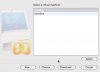
Here's the Select dialog. The missing VM is called 'MetaBox'

The VM IS on disk, and does work - if I double click the .pvs file, it starts perfectly.
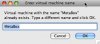
If I select 'Choose..' from the select dialog, and choose the missing VM, it says that the VM name is already in use, and asks me to choose another name. Choosing a new name DOES NOT add it to the select list.
Here's the response to choosing the MetaBox.pvs file:

Why does it not appear in the Select list, and how can I get it back into the dialog list under it's proper name. ?
Here's the Select dialog. The missing VM is called 'MetaBox'
The VM IS on disk, and does work - if I double click the .pvs file, it starts perfectly.
If I select 'Choose..' from the select dialog, and choose the missing VM, it says that the VM name is already in use, and asks me to choose another name. Choosing a new name DOES NOT add it to the select list.
Here's the response to choosing the MetaBox.pvs file:
Why does it not appear in the Select list, and how can I get it back into the dialog list under it's proper name. ?