VPN address doesn't map correctly in version 4

griffdb

Member
I connect to my company's network via OpenVPN. We have internal webpages mapped to http://wiki.zuken.com

I used to be able to see the internal server under Parallels version 3.x; it no longer works correctly under 4.x.

If I do an nslookup of wiki.zuken.com, I get:
C:\Documents and Settings\Griff>nslookup wiki.zuken.com
*** Can't find server name for address 10.211.55.1: Non-existent domain
Server: holden.vpn.zuken.com
Address: 10.1.8.4

Name: wiki.zuken.com
Address: 10.1.4.24


If I ping wiki.zuken.com, I get:
C:\Documents and Settings\Griff>ping wiki.zuken.com

Pinging wiki.zuken.com [207.69.131.9] with 32 bytes of data:

Control-C
^C

Therefore, I cannot navigate via web browser to the internal pages. I get a message from Earthlink saying that it can't find wiki.zuken.com.

However, I can ping 10.1.4.24 just fine.

I would appreciate any ideas on how to resolve this.

Thanks.

--Griff
 
Hello,

you need a static IP address for VPN connections. Try switching to bridged networking mode: Configure -> Network Adapter.
 
I didn't need a static IP address in Parallels 3.

Is this a new requirement?

I'm more concerned about the difference between pinging wiki.zuken.com not yielding the same address as nslookup of wiki.zuken.com.

Thoughts on this?

Thanks.
 
I didn't need a static IP address in Parallels 3.

Is this a new requirement?

I'm more concerned about the difference between pinging wiki.zuken.com not yielding the same address as nslookup of wiki.zuken.com.

Thoughts on this?

Thanks.

This is due to the order of DNS-servers (it seems that in PD30 they were placed in different order).

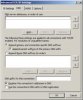
As a workaroung, please set custom DNS configuration in your TCP/IP protocol settings. Please open Network Connections (Control Panel -> Network and Internet Connections->Network Connections) right-click on Local Area Connection (that one, which is "Parallels Ethernet Adapter")->Properties->TCP/IP->Properties->Advanced->DNS and add DNS servers:

1) your ISP's DNS server (e.g. your DNS should be 10.1.8.4)

2) 10.211.55.1 (if you are using Shared Networking)

attachment.php
 

Attachments

  • dns.jpg
    dns.jpg
    12.3 KB · Views: 22
Last edited:
I connect to my company's network via OpenVPN. We have internal webpages mapped to http://wiki.zuken.com

I used to be able to see the internal server under Parallels version 3.x; it no longer works correctly under 4.x.

If I do an nslookup of wiki.zuken.com, I get:
C:\Documents and Settings\Griff>nslookup wiki.zuken.com
*** Can't find server name for address 10.211.55.1: Non-existent domain
Server: holden.vpn.zuken.com
Address: 10.1.8.4

Name: wiki.zuken.com
Address: 10.1.4.24


If I ping wiki.zuken.com, I get:
C:\Documents and Settings\Griff>ping wiki.zuken.com

Pinging wiki.zuken.com [207.69.131.9] with 32 bytes of data:

Control-C
^C

Therefore, I cannot navigate via web browser to the internal pages. I get a message from Earthlink saying that it can't find wiki.zuken.com.

However, I can ping 10.1.4.24 just fine.

I would appreciate any ideas on how to resolve this.

Thanks.

--Griff
Could you please post also what is the results of "nslookup wiki.zuken.com" and "ping wiki.zuken.com" made in the Mac OS X?
 
Thank you. I thought there was a setting for this, but I had forgotten what it was.

It'd be interesting to see the results of "nslookup wiki.zuken.com" and "ping wiki.zuken.com"... The story is that there could be a funny situation when VPN names were correctly resolved (eventually) at the PD30 side and not at the Mac OS X side -)

Anyway, modifying setting for DNS seems to be the most correct action even for Parallels Desktop 3.0
 
Back
Top