When I try to upgrade to Windows 10 -- Get stuck at Getting Updates

George Shafer

Bit poster
Following the procedure provided, it gets stuck here every time. It is the only reason I upgraded to the lastest version is to run the new windows.
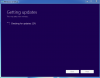
upload_2015-8-20_16-53-42.png
 
I'm getting the same result. Parallels 11 with upgrading Windows 7 64 bit. Have you opened a support ticket? I haven't yet but likely will shortly.
 
In the end, I created a physical Win 10 install USB drive and installed from there. Flawless install after that.
 
Following the procedure provided, it gets stuck here every time. It is the only reason I upgraded to the lastest version is to run the new windows.
Hi,
1. Make sure you have 2-4GB of RAM space allocated for Windows to update
2. Increase your hard disk space and ensure your local disk C has more than 10 GB free space available for the upgrade, refer this article to increase hard disk space
3. Uninstall Antivirus from Windows 7 if any before upgrading to Windows 10,Now proceed with the upgrade it should work.
 
Mine took forever and finally went to the license step, but then it went to "Getting Updates" a second time where it says "Checking for updates: 0%" It's not going past 0%. I have 4GB of memory allocated and my disk is 64GB expandable. I don't understand why Parallels can't make this easier to do. It's so confusing. I have no idea how long to wait and know if it's working or not. The process should tell me what to do for settings before starting the process and wasting my time. One thing is for sure, Microsoft just plain sucks when it comes to software updates.

The step says "This may take a few minutes." It's been 10 min and still at 0%. Seriously?!
 
Last edited:
This solution has really helped me a lot, thanks. The fact is that when I work on my project, it is extremely important for me to have the latest updates.
I am very grateful to you, thank you
 
Last edited by a moderator:
Back
Top