
In my Windows 11 guest OS running on 2019 MBP with i9 / UHD 630 GPU, I get all these white pixels around the start menu and in other various apps. I can get them to go away by enabling "Always use high-performance graphics" in my Parallels config.
Is there another setting that gets around this issue but is easier on my battery? Is this a bug in Parallels or Windows?
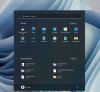
Is there another setting that gets around this issue but is easier on my battery? Is this a bug in Parallels or Windows?