Why won't read my OEM Win XP Pro CD?

teddyb109

Bit poster
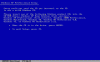
I have an OEM copy of Windows XP that I've been trying to install --I have the Virtual Machine up and running, it goes through the setup sequence and then I get an error that says:

"Please insert one of the following windows product CDs into the CD ROM drive: Windows XP Home..." (see attached screenshot)

The thing is that this *IS* a full copy of Windows (Version 2002) that I have installed before. (Uninstalled it from that PC...)

I tried cleaning the CD, thinking that maybe it was having trouble reading it.

I also tried ejecting the CD and re-inserting it--when I do that, it seems the VM can no longer read the CD ROM drive.

Thanks for peeking in and for your ideas.

-ted
 

Attachments

  • 2006.04.08-07.54.06.gif
    2006.04.08-07.54.06.gif
    13.4 KB · Views: 10
Try to:

1. Close Parallels.
2. Inser CD.
3. Start Parallels again.
4. Open/Create VM configuration.
5. Start VM.
 
Also, if all else fails, just make an ISO image of the disc with Toast or Disk Utility, and set the Parallels CD settings to "point" at that image file.
 
burning iso images

Thanks! I created a disk image, using disk utility but it doesn't seem to be an iso image--it had a .cdr extension--do I need Toast for this job? Or are there alternatives?
 
teddyb109 said:
Thanks! I created a disk image, using disk utility but it doesn't seem to be an iso image--it had a .cdr extension--do I need Toast for this job? Or are there alternatives?

No need. Just change the extension to

.iso

This should do the trick
 
still no dice w/ image files

OK - thanks to the tips, I was able to use the image that I created, but I'm still getting the same exact error--(only much faster now that it doesn't have to access the CDR) that I need another windows CD. Now I'm wishing I hadn't tossed that version of 98 I had lying around...

Ideas?

I also did try as Anshar suggested--restarting and removing media.
 
additional data about the disk

It's a Microsoft Windows XP Professional, Includes SP1, Academic Edition. I also tried loading it up under boot camp (I know, the docs say SP 2 is required, but I wanted to see what would happen--I got the same error.)
 
After all that we've tried, I think there's just something wrong with the disc, though it shows no visible scratches. I almost wonder if MS made the academic edition with an expiration date or something--as I did use that CD to install XP on a Dell a few years back. Thanks for everyone's help!
 
Back
Top