Windowed VMs

RodB

Member
Recently, when I open my VMs, it has begun opening them as tabs in the same window. This is not what I desire; I want each VM to open in its own window as they used to. How do I disable this annoying behavior? Yes, I know I can right-click the tab and select "Move tab to new window" but I don't want to have to do that every time.
 
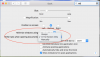
There is the option: Go to Dock System Preferences.
 

Attachments

  • Screen Shot 2017-12-12 at 14.07.14.png
    Screen Shot 2017-12-12 at 14.07.14.png
    200.4 KB · Views: 6
@alexg -- I wasn't aware of that setting in the Mac. I've never experienced this behavior with any other application. But, then, I can't think of another application where I may've opened child windows as full-screen. I have toggled that and will see if it makes a difference.
 
Last edited:
Back
Top