
ParallelsU1615
Bit poster
Subject: Windows 11 VM cannot read its virtual disk after upgrading to macOS 27 (BlockIo read error at sector 0)
SUMMARY
After upgrading macOS from 26.6.2 to macOS 27 on 23 September 2026, my Windows 11 (ARM) VM no longer boots. The VM starts and reaches the UEFI firmware, but it cannot read anything from its virtual hard disk. The disk file itself appears intact.
ENVIRONMENT
- Mac: Apple Silicon
- macOS: 27 (upgraded from 26.6.2 on 23 Sep 2026)
- Parallels Desktop: 27.0.1 (58670)
- VM: Windows 11 ARM, 8192 MB RAM, UEFI, TPM chip present (TPM data encrypted, password in macOS Keychain)
- VM location: ~/Parallels/Windows 11.pvm (internal drive, not iCloud or external storage)
- VM encryption: off
TIMELINE
- 23 Sep, 21:33: last write to the .hds data file
- 23 Sep, approx. 22:00: macOS upgrade finished and Mac restarted (last console login 22:01). The VM was likely running or being suspended when the upgrade started.
- 24 Sep, morning: VM no longer boots
SYMPTOMS
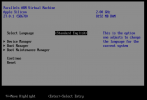
1. On start, the VM goes straight to the UEFI firmware setup screen instead of booting Windows.
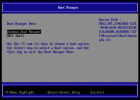
2. Boot Manager lists "Windows Boot Manager" (HD(2,GPT,2146506A-C32E-4F4B-A578-892922367440,0x96800,0x96000)/\EFI\Microsoft\Boot\bootmgfw.efi) and "UEFI Shell". Selecting Windows Boot Manager flashes and returns to the menu.
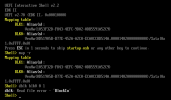
3. In the UEFI Shell, the mapping table shows only BLK0 (the SATA disk) and BLK1. There are no partition BLK entries and no FS0. "map -r" gives the same result.
4. "dblk blk0 0 1" returns: dblk: Read file error - 'BlockIo'. The VM cannot read even sector 0 of its disk.
TROUBLESHOOTING DONE
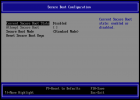
- Disabled Secure Boot with the boot flag vm.efi.secureboot=0 (per KB 131131). The firmware confirms Secure Boot is disabled, but the problem persists, so Secure Boot is not the cause. The TPM chip has NOT been removed.
- "Select boot device on startup" was found ticked in Boot Order. This explains why the firmware menu appears, but not the read failure.
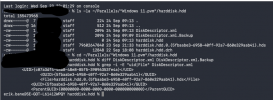
- Verified the disk package ~/Parallels/Windows 11.pvm/harddisk.hdd contains:
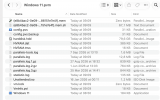
- DiskDescriptor.xml (rewritten 24 Sep 09:13) and DiskDescriptor.xml.Backup (24 Sep 09:09). These are identical (diff shows no difference).
- harddisk.hdd (0 bytes)
- harddisk.hdd.0.{5fbaabe3-6958-40ff-92a7-860e329aab41}.hds, 79,602,647,040 bytes, last modified 23 Sep 21:33
- harddisk.hdd.drh (22 Sep 18:08)
- The DiskDescriptor.xml GUID and File entries match the .hds filename. ParentGUID is all zeros (no snapshot chain).
- The .hds header is intact: it starts with the "WithoutFreeSpace" signature and describes a 256 GB virtual disk. The 4 bytes at offset 0x2C read "pd17". Please check whether this indicates the image was not closed cleanly.
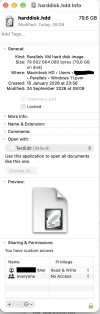
- Permissions: my user has Read & Write, file not locked. The only extended attribute is com.apple.provenance (no quarantine).
- In the VM folder, the {e8b4bac2-...}.mem file is 0 bytes and the .mem.sh file is 67.1 MB, suggesting an interrupted suspend during the macOS upgrade.
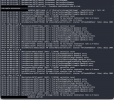
- parallels.log shows no disk-related errors. Only OpenGL, BattWatcher and MonitorArm messages, plus "[AHCI: ] [SATA0] controller reset" at each start.
REQUEST
Please help me get the VM to read its disk again without losing data. I have a backup copy of the .pvm.
SUMMARY
After upgrading macOS from 26.6.2 to macOS 27 on 23 September 2026, my Windows 11 (ARM) VM no longer boots. The VM starts and reaches the UEFI firmware, but it cannot read anything from its virtual hard disk. The disk file itself appears intact.
ENVIRONMENT
- Mac: Apple Silicon
- macOS: 27 (upgraded from 26.6.2 on 23 Sep 2026)
- Parallels Desktop: 27.0.1 (58670)
- VM: Windows 11 ARM, 8192 MB RAM, UEFI, TPM chip present (TPM data encrypted, password in macOS Keychain)
- VM location: ~/Parallels/Windows 11.pvm (internal drive, not iCloud or external storage)
- VM encryption: off
TIMELINE
- 23 Sep, 21:33: last write to the .hds data file
- 23 Sep, approx. 22:00: macOS upgrade finished and Mac restarted (last console login 22:01). The VM was likely running or being suspended when the upgrade started.
- 24 Sep, morning: VM no longer boots
SYMPTOMS
1. On start, the VM goes straight to the UEFI firmware setup screen instead of booting Windows.
2. Boot Manager lists "Windows Boot Manager" (HD(2,GPT,2146506A-C32E-4F4B-A578-892922367440,0x96800,0x96000)/\EFI\Microsoft\Boot\bootmgfw.efi) and "UEFI Shell". Selecting Windows Boot Manager flashes and returns to the menu.
3. In the UEFI Shell, the mapping table shows only BLK0 (the SATA disk) and BLK1. There are no partition BLK entries and no FS0. "map -r" gives the same result.
4. "dblk blk0 0 1" returns: dblk: Read file error - 'BlockIo'. The VM cannot read even sector 0 of its disk.
TROUBLESHOOTING DONE
- Disabled Secure Boot with the boot flag vm.efi.secureboot=0 (per KB 131131). The firmware confirms Secure Boot is disabled, but the problem persists, so Secure Boot is not the cause. The TPM chip has NOT been removed.
- "Select boot device on startup" was found ticked in Boot Order. This explains why the firmware menu appears, but not the read failure.
- Verified the disk package ~/Parallels/Windows 11.pvm/harddisk.hdd contains:
- DiskDescriptor.xml (rewritten 24 Sep 09:13) and DiskDescriptor.xml.Backup (24 Sep 09:09). These are identical (diff shows no difference).
- harddisk.hdd (0 bytes)
- harddisk.hdd.0.{5fbaabe3-6958-40ff-92a7-860e329aab41}.hds, 79,602,647,040 bytes, last modified 23 Sep 21:33
- harddisk.hdd.drh (22 Sep 18:08)
- The DiskDescriptor.xml GUID and File entries match the .hds filename. ParentGUID is all zeros (no snapshot chain).
- The .hds header is intact: it starts with the "WithoutFreeSpace" signature and describes a 256 GB virtual disk. The 4 bytes at offset 0x2C read "pd17". Please check whether this indicates the image was not closed cleanly.
- Permissions: my user has Read & Write, file not locked. The only extended attribute is com.apple.provenance (no quarantine).
- In the VM folder, the {e8b4bac2-...}.mem file is 0 bytes and the .mem.sh file is 67.1 MB, suggesting an interrupted suspend during the macOS upgrade.
- parallels.log shows no disk-related errors. Only OpenGL, BattWatcher and MonitorArm messages, plus "[AHCI: ] [SATA0] controller reset" at each start.
REQUEST
Please help me get the VM to read its disk again without losing data. I have a backup copy of the .pvm.
Attachments
-
 01_UEFI_Shell_dblk_BlockIo_read_error.png184.3 KB · Views: 2
 -
 07_Startup_lands_in_UEFI_setup.png110.8 KB · Views: 2
 -
 06_Secure_Boot_disabled.png93.2 KB · Views: 2
 -
 05_Finder_pvm_contents_timestamps.png290 KB · Views: 1
 -
 02_Boot_Manager_Windows_device_path.png133.7 KB · Views: 1
 -
 03_Terminal_hdd_listing_diff_DiskDescriptor.png90.2 KB · Views: 1
 -
 04_Terminal_hds_header_WithoutFreeSpace.png36.4 KB · Views: 2
 -
 08_parallels_log_disk_lines.png320.9 KB · Views: 2
 -
 09_hdd_file_info_permissions.png197.9 KB · Views: 3