After the update to Big Sur and the latest Parallels Patch I can't access the Internet via my Windows 7 anymore. On the Mac side and my router everything is fine and Before the update I never had any problems. This is highly critical for as I'm dependent on the Internet. This is really a disaster.

Install the app
How to install the app on iOS
Follow along with the video below to see how to install our site as a web app on your home screen.
Note: This feature may not be available in some browsers.
You are using an out of date browser. It may not display this or other websites correctly.
You should upgrade or use an alternative browser.
You should upgrade or use an alternative browser.
Windows 7 (Parallels 16 + Big Sur) No internet connection
- Thread starter ClaudiaT1
- Start date
jsNashville
Bit poster
I have the same issue with Windows 10. I am able to access the internet if I switch to "Bridged Network", but the shared network will not work at all.
The same problem: Big Sur, Parallels, Windows 10 - everything updated to latest versions - only Bridget Network works.I have the same issue with Windows 10. I am able to access the internet if I switch to "Bridged Network", but the shared network will not work at all.
tom325@ME.com
Bit poster
Same issue for me with Windows 10. I also created a new instance of Win 10 - so nothing from another vendor is in the install and that, too, does not work - tried reinstalling toolbox (after deleting the installed tools) - still nothing for internet connections.
Yes, this IS A PROBLEM. Last month under Catalina, internet access worked fine. Two weeks ago, I upgraded the MAC OS to Big Sur, and still everything worked fine. Then one day last week Parallels updated to Version 16.1.1 (49141), but I don't think Parallels Tools was updated at that time, but I did not pay that much attention to it because I thought everything was working just fine. Then, the other day I saw a new version of Parallels Tools get installed and I believe that is when the problem started. The next morning when Quicken was attempting to log on it came back with the error saying that it could not get to the internet. Strange, I just downloaded my mail on the MAC side and everything was fine. I checked Safari on the MAC side and all was good. I switched over the Windows and Internet Explorer and it could not find the internet just like Quicken. I guess I really did have a problem. Now, after FAR TO MANY hours spent on this problem, I have at least temporarily resolved the internet connection side of the problem. By going to Parallels> Configure> Hardware> Network> I saw that my network Source was Shared Network (Recommended). I switched it to EACH OF THE Bridged Network choices (Default Adapter, Wi-Fi, and Ethernet) and they connected me to the internet; however, at slower speeds than when on my MAC side. So, while this appears to be a temporary solution that allows me to connect to the internet, I do not think that the computer can actually "see" all the files on that MAC, i.e., full sharing.
I sure hope this gets enough attention of the experts at Parallels this week, because not having internet access IS A BIG DEAL for many. Let's hope for a quick resolution.
I sure hope this gets enough attention of the experts at Parallels this week, because not having internet access IS A BIG DEAL for many. Let's hope for a quick resolution.
After the update to Big Sur and the latest Parallels Patch I can't access the Internet via my Windows 7 anymore. On the Mac side and my router everything is fine and Before the update I never had any problems. This is highly critical for as I'm dependent on the Internet. This is really a disaster.
You might try going to Parallels (top of screen), > Configure > Hardware > Network > and change the SOURDE to Default Adapter. Albeit a temporary solution, it might you to the Internet - Good Luck.
RichardB21
Bit poster
Thanks, johnM100. Switching both my Windows-10 VM and Mojave VM to Default Adapter did the trick.
Giuseppe Lanzi
Bit poster
I had the same issue, but I had to solve it differently. In my case internet was actually reachable (I was able to ping google.com) but IE won't access any website.
The issue derives from the TLS standard that's now 1.2. In my Windows 7 ultimate x64 iso image TLS 1.1 and TLS 1.2 was disabled.
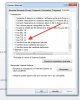
I solved it by going to Internet Options > Advanced and by enabling TLS 1.1 and TLS 1.2. (See screenshot).
Hope it helps.
The issue derives from the TLS standard that's now 1.2. In my Windows 7 ultimate x64 iso image TLS 1.1 and TLS 1.2 was disabled.
I solved it by going to Internet Options > Advanced and by enabling TLS 1.1 and TLS 1.2. (See screenshot).
Hope it helps.