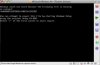
I am running Parallels build 5582 on Leopard 10.5.1. I have been running it for a while without any problems. Today I resumed my saved state (as I normally do) and the Windows screen was frozen. The green hills desktop of XP showed up, but I couldn't do anything (ex: open the start menu, click on icons, etc.). That happens from time to time with Parallels, so I had to manually reset the virtual machine. When I did, it wouldn't go past the black screen. It gave me an error message:
So what happened??? Is my Windows install screwed? or is there something I can do to resurrect this thing?
I tried pressing 'r' like the instructions said. It did something, but then took me back to that same black screen.Windows could not start because the following file is missing or corrupt:
\WINDOWS\SYSTEM32\CONFIG\SYSTEM
You can attempt to repair this file by restarting Windows Setup using the original Setup CD-ROM.
Selet 'r' at the first screen to start repair.
So what happened??? Is my Windows install screwed? or is there something I can do to resurrect this thing?