Windows Guest: All windows apps shown in Safari as possible default browser

MarcusMuench

Bit poster
I have a virtual machine with Windows 7 64 as guest system and active application sharing (Windows -> Mac). All applications that are installed in the Windows machine (also all standard applications as ODBC setup etc) are shown in Mac Safari as applications that could be set as default browser in the corresponding settings dialog in Safari. This creates dozens of entries in the default browser drop down list and is extremely annoying. Is there a way to get rid of the entries so they will never come back?
 
All Windows Apps in Safari

I have a virtual machine with Windows 7 64 as guest system and active application sharing (Windows -> Mac). All applications that are installed in the Windows machine (also all standard applications as ODBC setup etc) are shown in Mac Safari as applications that could be set as default browser in the corresponding settings dialog in Safari. This creates dozens of entries in the default browser drop down list and is extremely annoying. Is there a way to get rid of the entries so they will never come back?

I'd really like the answer to this as well. Very annoying.
 
I'd really like the answer to this as well. Very annoying.

Add me to the list. I opened a support ticket to address this. I can get the windows apps to disappear temporarily by rebuilding the launch services database, but eventually they all return.

I can understand the windows browsers showing up here, but not every single windows app!

If support is able to help, I will post back.
 
From support:

Unfortunately, the details that populates under the open with details will stay there. We do not have any options to filter/sort or even remove them permanently.

Since the sharing profile holds the settings for that. We have already tested on our end to disable the Sharing features between Windows and Mac to check if that will make the list be clean. However, it will stay that way while we are running Parallels Desktop.

Please email us back regarding the outcome of the suggested steps/article above if it did help us on solving the concern.​

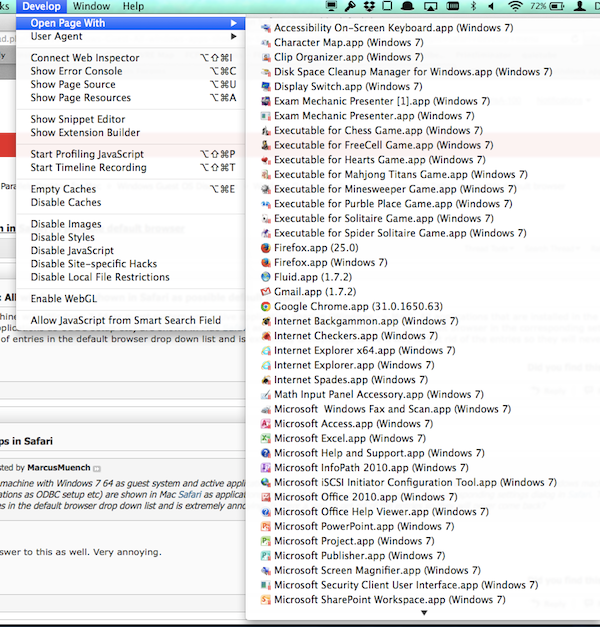
I have attempted to escalate the ticket. It should at least be acknowledged as a bug. There is no reason 119 windows apps should show up in the Safari "Open With" menu. Very few of them are capable of opening a web page.
 
Well, maybe that isn't a bug but a very ugly feature with no useful reason to exist.
I mean, why i even could set Notepad as my default browser anyway?
At least if they will sort these apps to some folder or whatnot, that will be less painful in the eyes not when setting that default browser (not exactly my everyday routine) but when I open up that 'open with' dialog.
And if you remove the app sharing checkbox in the virtual machine settings, windows apps are still there: in safari, in 'open with' - sometimes with their twin sisters and brothers with same names.

There's a cache of these somewhere so you could grab it and clean up. Maybe I'll give it a try later. You could google that solution.
So it's not on Parallels to fix this issue, I guess.
But it'd be really helpful if they throw in some option to clean the mess when I've change my mind about sharing windows apps to mac.
 
Well, maybe that isn't a bug but a very ugly feature with no useful reason to exist.
I call it a bug. Any other application registered with OSX launch services properly associates with the types of things it can open. The Develop menu is not culttered full of native OS X applications.

And if you remove the app sharing checkbox in the virtual machine settings, windows apps are still there: in safari, in 'open with' - sometimes with their twin sisters and brothers with same names.

There's a cache of these somewhere so you could grab it and clean up. Maybe I'll give it a try later. You could google that solution.

You refer to rebuilding the OS X launch services database, as I mentioned earlier in this thread.

This will indeed remove the items from the menu. They will return unless you turn off sharing with OSX.
This is a workaround, not a solution. Turning off sharing should not be required here. There is no reason 99% of these items should show up on the Safari Develop>Open With menu.

So it's not on Parallels to fix this issue, I guess.

I disagree strongly. Clearly an error in their method of registering windows apps with OS X is at fault.

My support experience with them has been poor. They do not seem to feel this is an issue. They think that turning off sharing is a "solution", when in fact it is a workaround that eliminates a key feature of their solution.
 
Last edited:
Parallels support elevated my request to Level 2. Today I received this response:
We have reproduced the issue and have the same results. Therefore we have submitted internal request to our Development team for further investigation. They will continue the work on the issue to elaborate a fix for it. We cannot promise that the issue will be addressed in the next Hotfix or release but the development team keeps track of the number of reports from customers in order to prioritize fixes.
In other words: they might fix it if enough people complain.

Please file a support request if this is important to you!
 
Parallles 9 still has this really annoying problem.

It does not affect only "default browser" but also the safari Develop menu. Many parallels users are developers, this impacts a lot of us.

Here is my Safari Develop > Open With menu. It is clogged with windows apps, most of which cannot open a web page:

SafariDevelopClutter.png


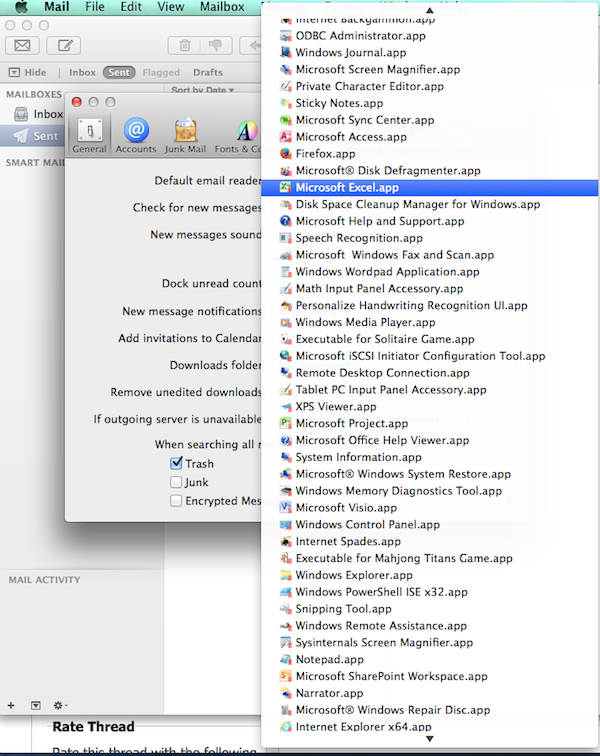
The problem also affects mail. Here is Mail.App's preference item "Default Mail Reader", stuffed to the gills with windows apps that cannot handle mail:

MailClutter.png


This is a really annoying bug. It has been around a LONG time. It is time to fix it.
 
Back
Top