Windows Programs Not Showing on the Mac dock While in Coherence mode

AntonieC

Bit poster
Well basically I have the latest build of Parallels 12 and Windows 10 in my MacBook Pro 15" (Late 2016) and yet the windows program are not being shown on the dock during coherence mode . I have uninstalled and reinstalled Parallels a couple of time and yet it's still til the same problem I'm having. I will provide you the screenshot of how my screen looks like in coherence mode. I have a get a solution asap. Thank you!
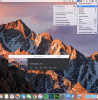
Screen Shot 2017-04-02 at 4.08.20 PM.png
Shouldn't there be a windows programs next to the paralles icon?
P.s. I have also uninstalled and reinstalled the tools
 
Well basically I have the latest build of Parallels 12 and Windows 10 in my MacBook Pro 15" (Late 2016) and yet the windows program are not being shown on the dock during coherence mode . I have uninstalled and reinstalled Parallels a couple of time and yet it's still til the same problem I'm having. I will provide you the screenshot of how my screen looks like in coherence mode. I have a get a solution asap. Thank you!
View attachment 12350
Shouldn't there be a windows programs next to the paralles icon?
P.s. I have also uninstalled and reinstalled the tools
Hello AntonieC, please try this article and keep us posted.
 
I think you must have misunderstood me, what I meant was there are no Windows' Icons showing up in my dock whatsoever. How do I make it show on the dock?
 
I think you must have misunderstood me, what I meant was there are no Windows' Icons showing up in my dock whatsoever. How do I make it show on the dock?
Please follow the steps below and let us know how it goes:
1. Click on Parallels Desktop icon (Two Red Parallels line) -> Select Preferences -> Click on General -> Drop down " Virtual Machine Dock Icons ", select OS Icon.
 
It was in "OS Icon" by default and still, open programs in windows 10 are not showing on the dock.
Hi, please shut down your virtual machine(Do not close the window), and follow the steps mentioned below to fix the issue:
1. Virtual machine's Configuration-> Options-> Applications
2. Select " Share Windows applications with Mac
3. Tick " Show Windows applications folder in Dock" and Show Dock icons in Coherence only" if it is needed.
 
Back
Top